
The SFF Revolution: NVIDIA’s New Standard for Compact Gaming Power
Small Form Factor (SFF) PCs have long captivated enthusiasts with their ability to pack immense gaming power into surprisingly compact designs. Yet, the allure of a desk-friendly, portable powerhouse often came with a significant hurdle: compatibility. Ensuring a high-performance GPU, a robust cooling solution, and a powerful PSU would all fit within a tight chassis was a puzzle many builders struggled to solve. This engineering challenge often led to compromises, either in component choice or the sheer volume of the build. Enter NVIDIA’s ‘SFF-Ready’ initiative, a game-changing guideline designed to demystify SFF component selection and usher in a new era of uncompromising compact gaming by standardizing critical dimensions and clearances.
Decoding “SFF-Ready”: What NVIDIA’s Guidelines Mean for Builders
Announced with updates including GeForce RTX 50 Series information as of January 6th, 2025, NVIDIA’s ‘SFF-Ready’ guideline establishes clear, standardized size parameters for both enthusiast graphics cards and compatible chassis. This initiative directly addresses the historical challenge of ensuring component compatibility, particularly for high-wattage GPUs like the upcoming RTX 50 Series, where even a few millimeters can dictate success or failure. By setting specific dimensional limits, NVIDIA aims to simplify the building process, ensuring that powerful hardware can be integrated without compromise, thereby reducing guesswork and potential costly errors for builders.
- GPU Compatibility: Applies to GeForce RTX 70-class or higher cards from the RTX 40 and RTX 50 Series.
- Guaranteed Fitment: Over 150 current and upcoming enthusiast cards meet these specifications.
- Dimensional Limits: Mandates specific clearances for power cables and connectors, previously not standardized.
- Case Requirements: Compatible cases must offer at least 312mm length clearance and 154.5mm clearance from the motherboard/riser to the case panel.
NVIDIA’s SFF-Ready badge simplifies component selection, ensuring your next enthusiast GeForce card (RTX 70-class and above) will fit without guesswork, even allowing for future GPU upgrades without a full system overhaul. This standard mandates specific clearances for power cables and connectors, a crucial detail often overlooked.
The Heart of the Matter: SFF Cases Under the Microscope
The case is arguably the most defining component of an SFF PC, dictating not only aesthetics but also the thermal and component compatibility limits. Its design is a delicate balance of compact volume with robust hardware support, directly impacting airflow and heat dissipation. Manufacturers are constantly innovating, offering unique designs that push the boundaries of what’s possible in a small footprint. From sandwich layouts that separate key components to vertical towers that leverage natural convection, each SFF chassis presents its own set of advantages and challenges, making careful selection paramount for optimal system performance and longevity.
SFF Case Showdown: Dimensions, Cooling & GPU Clearance
| Case Model | Volume (L) | Max GPU Length | Max CPU Cooler Height | PSU Type | Key Features | SFF-Ready Compatible? |
|---|---|---|---|---|---|---|
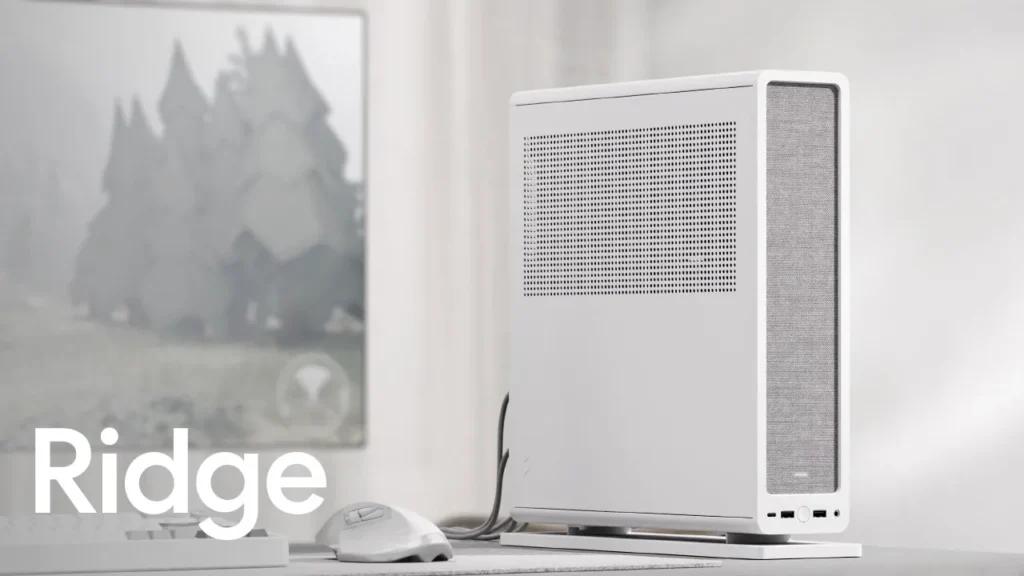
| Fractal Design Ridge | 12.6 | 335 mm (no SSD) | 70 mm | SFX/SFX-L | Slimline format, fabric front, tool-less panels, versatile orientation, 2x 140mm fans pre-installed. | Yes (Explicitly mentioned) |
| Cooler Master NR200P | 18.25 (approx) | 330 mm | 155 mm (air), 60 mm (AIO) | SFX/SFX-L | Modular design, versatile cooling, tempered glass/ventilated side panels. | Yes (Explicitly mentioned) |
| NCASE T1 Sandwich Kit | 10.0 (approx) | 325 mm (approx) | 70 mm (air) | SFX/SFX-L | Premium, precision-crafted, highly modular, community-driven design. | Yes (Meets general SFF-Ready spirit) |
| Thermaltake TR100 Mini Tower | 18.4 | 360 mm | 68 mm (air), 280mm AIO | SFX/SFX-L | Dual-chamber design, dismantlable modular, optional LCD screen & travel trunk. | N/A (Not explicitly labeled, but SFF) |
| Thermaltake Tower 100 | 21.7 (approx) | 330 mm | 190 mm | PS2 (ATX up to 180mm) | Vertical design, panoramic tempered glass, extensive cooling options, modular panels. | N/A (Not explicitly labeled, but SFF) |
| Thermaltake Tower 200 Snow | 20.5 (approx) | 380 mm (no power cover), 280 mm (with power cover) | 200 mm | ATX (up to 220mm) | Mini-ITX, vertical design, dual 140mm fans pre-installed, extensive radiator support. | N/A (Not explicitly labeled, but SFF) |

The Thermal Tightrope: Cooling High-Wattage GPUs in SFF
Integrating high-wattage GPUs, such as the upcoming RTX 5080/5090, into confined SFF cases demands meticulous thermal planning. The restricted airflow and proximity of components can quickly lead to heat saturation and thermal throttling, undermining performance and potentially shortening component lifespan. This is a critical engineering challenge, as the efficiency gains of modern GPUs must be matched by effective heat dissipation. Builders must carefully consider their cooling strategy, balancing the benefits and drawbacks of traditional air versus All-in-One (AIO) liquid cooling solutions to maintain optimal operating temperatures and unlock peak performance.
Air Cooling vs. AIO in SFF
Pros
- Air Cooling: Simpler installation, generally lower cost, fewer points of failure (no pump to fail), good for lower-to-mid TDP CPUs, no liquid leakage risk.
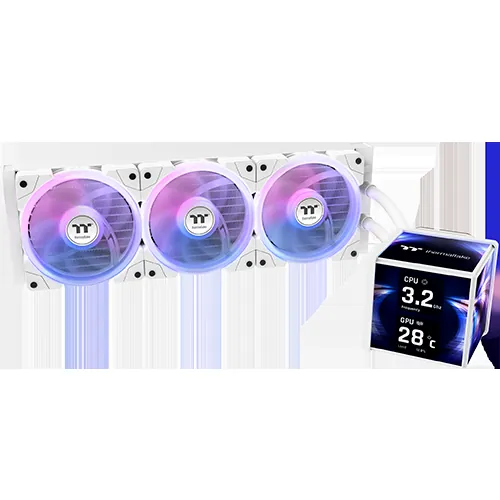
- AIO Liquid Cooling: Superior CPU cooling for high-end CPUs, frees up space around the CPU socket, can exhaust heat directly out of the case via radiator fans, often quieter under load for the CPU.
Cons
- Air Cooling: Limited by case height, can impede airflow to other components, less effective for very high TDP CPUs, can be louder due to fan size/speed.
- AIO Liquid Cooling: More complex installation, higher cost, pump noise/failure potential, radiator placement can restrict GPU/case fans, potential for liquid leaks (though rare).
9060 XT TDP-165w 7700 XT TDP-245w I’ll take the one that costs less, and consumes less power, while giving me the same performance.
LoadSyn Fandom Pulse
Component Synergy: Optimizing Your SFF Build
Beyond the GPU and case, every component choice in an SFF build is magnified, each interacting with the others in a delicate balance. Motherboard form factors (Mini-ITX/Micro-ATX), power supply size, and even storage thermals play a crucial role in overall system stability and performance within the confined space. Achieving true synergy means meticulously considering how each part interacts, from cable routing to airflow pathways, to ensure optimal thermal management and power delivery, ultimately unlocking the full potential of your compact powerhouse.
- Power Supply: Always prioritize SFX or SFX-L power supplies. Their smaller footprint is essential, and many offer modular cabling for better management, which is critical for maintaining airflow in tight spaces.
- Motherboard: Stick to Mini-ITX or Micro-ATX boards. Consider newer designs like back-connect motherboards (e.g., MSI MAG Pano M100R PZ) to move connectors to the rear, significantly improving cable management and airflow within the main chassis.
- Storage: PCIe 5.0 SSDs are incredibly fast but can generate significant heat. Opt for drives with integrated heatsinks or ensure direct airflow to prevent thermal throttling in confined SFF spaces, as performance can degrade rapidly under high temperatures.
- CPU Cooler: Carefully check maximum CPU cooler height against case specifications. While air coolers are simpler, AIOs can offer superior performance for high-end CPUs if the case supports the radiator, often exhausting heat directly out of the chassis.
- GPU Selection: Leverage NVIDIA’s SFF-Ready guidelines. Double-check GPU length, height, and thickness against your chosen case’s clearances, paying particular attention to power connector space, as these can often be the tightest points.
The SFF-Ready Era: Power Without Compromise
NVIDIA’s SFF-Ready initiative marks a pivotal moment for compact gaming PCs. By standardizing compatibility, it removes significant guesswork and frustration, empowering enthusiasts to build powerful, space-saving rigs without sacrificing performance. This engineering-driven solution directly addresses the historical pain points of SFF building, allowing for more confident component selection and future-proofing. As component efficiency continues to improve and case designs evolve, the allure of the Small Form Factor PC will only grow, proving that big gaming experiences can indeed come in small packages. The era of uncompromising compact gaming has truly arrived, offering builders more freedom and less hassle than ever before.
Frequently Asked Questions
What does ‘SFF-Ready’ truly mean?
NVIDIA’s ‘SFF-Ready’ guideline establishes clear dimensional limits for GeForce RTX 70-class or higher GPUs and compatible cases, ensuring guaranteed fitment and necessary clearances for power cables. It simplifies component selection for small form factor builds.
Which NVIDIA GPUs are SFF-Ready?
Over 150 current and upcoming enthusiast cards, specifically RTX 70-class or higher from the RTX 40 and RTX 50 Series, meet these specifications. Look for the ‘SFF-Ready Enthusiast GeForce Cards’ label from partners like ASUS, MSI, GIGABYTE, and Zotac.
What are the main challenges of SFF PC building?
The primary challenges include thermal management (dissipating heat from high-wattage components in confined spaces), component compatibility (ensuring GPUs, CPU coolers, and PSUs physically fit), and efficient cable management to maintain airflow.
Can I use an AIO liquid cooler in an SFF case?
Yes, many SFF cases, like the Thermaltake TR100, support AIO radiators (e.g., up to 280mm). AIOs can be highly effective for CPU cooling in SFF, but careful planning for radiator placement and fan configuration is essential.
Are there specific power supplies for SFF builds?
Yes, Small Form Factor (SFF) PCs typically require SFX or SFX-L power supplies, which are physically smaller than standard ATX PSUs, allowing them to fit into compact chassis designs.
How do back-connect motherboards help SFF builds?
Back-connect motherboards move power and data connectors to the rear of the motherboard tray, significantly improving cable management and airflow within the main chamber of compact cases, leading to cleaner builds and better thermals.