
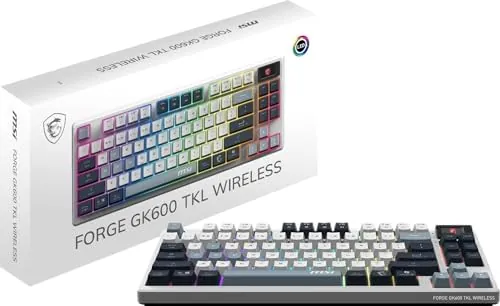
The MSI Forge GK600 TKL is a rare beast in the sub-$100 market: a board that actually prioritizes acoustic engineering with a gasket-mount system and premium dampening. It delivers a ‘thocky’ typing experience usually reserved for custom builds, though users must weigh this against a dismal 24-hour battery life (with RGB enabled) and a total lack of software customization for its onboard LCD screen.
At CES 2025, the MSI Forge GK600 TKL emerged as a serious challenger to the budget status quo. Historically, MSI’s peripheral line has focused on entry-level membrane combos, but this ‘Special Edition’ is a clear pivot toward the enthusiast community. By integrating gasket mounts and multi-layer sound dampening into a mass-market product, MSI is attempting to disrupt the market, bringing the premium ‘thock’ sound profile to a price point where hollow plastic pings are usually the norm.
Acoustic Engineering: The Gasket-Mount Surprise
The defining feature of the GK600 is its internal stack. MSI didn’t just slap a ‘mechanical’ label on this; they implemented a genuine gasket-mount system paired with six distinct layers of sound-dampening foam. In our testing, this configuration effectively isolates the PCB from the plastic chassis, eliminating the metallic resonance common in budget boards. The factory pre-lubed KTT Linear switches provide a buttery-smooth travel that, when combined with the gasket flex, results in an exceptional out-of-the-box ‘thock’ that rivals custom builds costing twice as much.
The Display & Connectivity: Function vs. Fluff

The 1.06-inch screen features a real-time battery indicator, connection mode icons (2.4G/BT/Wired), and an animated ‘Lucky’ the Dragon mascot.
The 1.06-inch LCD screen is a polarizing addition. While it is genuinely useful for monitoring battery levels and connection modes without memorizing LED blink codes, its utility ends there. Unlike the screens on high-end boards from ASUS or SteelSeries, there is currently no MSI companion software to upload custom GIFs or system telemetry. On the connectivity front, the tri-mode support is robust, allowing you to pair with up to five devices simultaneously—a major win for users juggling a gaming rig, a work laptop, and a tablet.
The Battery Bottleneck: A 24-Hour Reality Check
Here is where the ‘Thock vs. Clock’ trade-off becomes painful. Despite housing a substantial 4000mAh battery, the GK600’s power efficiency is surprisingly low when the RGB is active. You can expect roughly 24 hours of use before needing a recharge—a figure that feels archaic compared to modern competitors. While turning the LEDs off extends the life to a claimed 20 days, the opaque PBT keycaps mean that without backlighting, the legends are nearly invisible in low light. For the wireless purist, this creates a frustrating choice: aesthetic flair or functional longevity.
| Feature | MSI Forge GK600 TKL | Endorfy Thock V2 TKL |
|---|---|---|
| Price | ~$80-99 | Variable (Budget-Tier) |
| Mounting | Gasket Mount | Tray Mount |
| Battery Life (RGB) | ~24 Hours | ~40-60 Hours |
| Hot-Swap | Yes (5-pin) | Yes |
| Screen | 1.06″ LCD | None |
- Incredible ‘thocky’ acoustics for the price
- Hot-swappable 5-pin PCB
- Solid, weighty build quality
- Multi-device tri-mode support
- Poor battery life with RGB enabled
- Opaque keycaps hinder night use
- No companion software for screen/macro customization
- Inaccessible connectivity switch
Frequently Asked Questions
The MSI Forge GK600 TKL is best described as an ‘Acoustic Masterpiece’ trapped in a ‘Budget Body.’ It offers the best-sounding typing experience you can find for under $100, bar none. However, it requires significant compromises in power management and software flexibility. If you plan to use it primarily in wired mode or don’t mind a frequent charging cadence, the sound profile alone makes it a mandatory purchase. For those seeking a ‘set it and forget it’ wireless experience, the clock might just run out too soon.