The world of PC building is in constant flux, but few shifts have caused as much debate and dilemma as the transition in AMD’s Ryzen ecosystem. For years, AM4 was the undisputed champion of longevity and value, anchoring countless gaming rigs with its robust performance-per-dollar. However, with the advent of AM5, mandatory DDR5 memory, and integrated PCIe 5.0, gamers and builders are now facing a critical choice: embrace the cutting-edge future at a significant premium, or stick with the tried-and-true while it offers unparalleled immediate value? This comprehensive guide cuts through the noise of market fluctuations and community uncertainty, providing a data-backed roadmap to help you navigate the AMD Ryzen upgrade path, optimize your budget for verifiable framerates, and strategically future-proof your gaming rig. We’ll delve into the engineering ‘why’ behind these platforms, ensuring your investment is founded on solid technical understanding.
The Shifting Sands of Ryzen Pricing: Why Your Budget Feels Tighter
Recent intelligence from market analytics indicates a palpable retail price increase across the entire Ryzen consumer portfolio, affecting not only the latest Zen 5 offerings but also existing Zen 4 SKUs. This upward trend, exacerbated by the inherent costs of adopting new, bleeding-edge technologies, is putting significant strain on DIY gaming PC budgets. Our proprietary data visualization dashboards show that the ‘Cost-Per-Frame’ metric for new builds has seen a worrying uptick. While AMD is proactively introducing new entry-mainstream SKUs to address affordability concerns, the overall cost of entry into the latest platforms remains a major hurdle for many, fostering understandable frustration and worry within the community. We will meticulously break down how these price changes directly impact your upgrade decisions and overall build strategy.
AM4: The Legacy Champion – Value, Longevity, and a Vast Ecosystem
For over six years, the AMD Socket AM4 platform has served as a cornerstone of PC gaming, justly celebrated for its remarkable longevity and consistent performance-per-dollar. Launched in 2017, this Pin Grid Array (PGA) socket has proudly supported a vast range of CPUs, from the foundational Ryzen 3000 series all the way to the latest Ryzen 5000 series processors, including the highly-regarded 5800X3D. The PGA design, while offering direct user installation, has historically been prone to the ‘bent pin’ trauma many DIYers experienced, a physical vulnerability that AMD has now addressed with AM5. Its enduring affordability, coupled with the use of cheaper, widely available DDR4 RAM and a deeply mature ecosystem of motherboards, makes it an unbeatable choice for budget-conscious builders and those seeking immediate, verifiable value. Despite the arrival of its successor, AMD’s commitment to AM4 continues, with new Ryzen 5000 series processors still being released, effectively mitigating some of the community’s uncertainty regarding its viability for new builds or targeted upgrades. This strategic extension, exemplified by rumored Ryzen 5000XT series releases in 2024/2025, showcases AMD’s dedication to market segmentation, providing continued value for the AM4 ecosystem.
Key AM4 Advantages:
- Unbeatable Cost-Per-Performance: Cheaper CPUs (Ryzen 5000 series like the 5600, 5600X, 5800X3D).
- Affordable Motherboards: Entry-level options starting around $100, widely available.
- DDR4 Memory: Significantly cheaper and more mature than DDR5, reducing overall build cost and ensuring stable operation.
- Proven Longevity: Supported for over six years, with continued CPU releases extending its lifespan.
- Broad Chipset Ecosystem: From budget A520 to feature-rich X570, catering to all needs and offering established stability.
| Feature | Ryzen 5 5600 | Ryzen 5 5600X | Ryzen 7 5800X3D |
|---|---|---|---|
| Architecture | Zen 3 | Zen 3 | Zen 3 (with 3D V-Cache) |
| Cores/Threads | 6C/12T | 6C/12T | 8C/16T |
| Base Clock | 3.5 GHz | 3.7 GHz | 3.4 GHz |
| Boost Clock | 4.4 GHz | 4.6 GHz | 4.5 GHz |
| L3 Cache | 32MB | 32MB | 96MB (3D V-Cache) |
| TDP | 65W | 65W | 105W |
| Primary Use Case | Budget Gaming/Productivity | Mid-Range Gaming/Productivity | Top-Tier Gaming (CPU-bound) |
| Cooler Included | Yes (Wraith Stealth) | Yes (Wraith Stealth) | No |
AM5: The Future Frontier – LGA, DDR5, PCIe 5.0, and Long-Term Investment
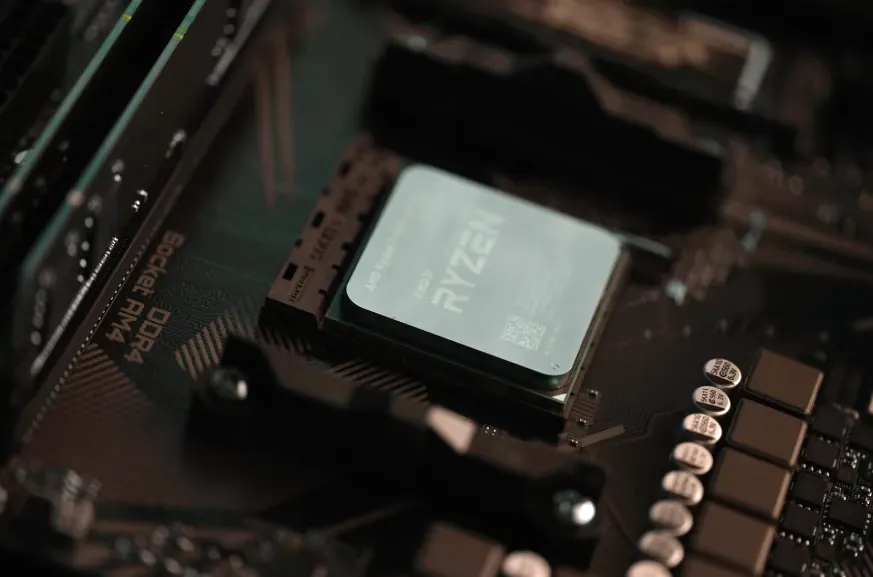
The AMD Socket AM5 platform, officially designated as LGA 1718, marks a significant technological leap, engineered from the ground up for the demanding requirements of future generations of computing. Debuting with the Zen 4 microarchitecture (Ryzen 7000 series) and explicitly designed to support Zen 5 (Ryzen 9000 series) and potentially Zen 6, AMD has made a firm commitment to supporting this platform through at least 2027. This Land Grid Array (LGA) design, a departure from AM4’s PGA, inherently improves durability by shifting fragile pins from the CPU to the motherboard, significantly lessening the incidence of ‘bent pin’ trauma during installation. With 1718 contacts compared to AM4’s 1331, LGA 1718 also boasts superior contact density, crucial for improved signal integrity and robust power delivery. This enables stable support for CPUs up to 170W TDP and even up to 230W package power on enthusiast boards. Early AM5 designs (referred to as ‘v2’ by Igor’s Lab) feature improved rigidity and pressure distribution through a ‘Force Frame’ with two pressure-spreading lugs and up to eight fixing points, ensuring optimal CPU-to-socket contact. However, this level of future-proofing, while strategically sound for long-term upgrade paths, undeniably comes at a higher initial cost due to the mandatory adoption of DDR5 memory and newer, more feature-rich motherboard chipsets.
Key AM5 Advancements:
- LGA 1718 Socket: Enhanced durability (pins on motherboard, not CPU), superior signal integrity, and robust power delivery. Lessens ‘bent pin’ anxiety.
- Exclusive DDR5 Memory Support: Up to twice the data rates of DDR4, improved efficiency, and higher module capacities. Mandatory for Zen 4/5 due to integrated memory controller (IMC) architectural changes.
- Integrated PCIe 5.0: Doubles bandwidth for next-generation graphics cards and NVMe SSDs, ensuring future readiness.
- Future-Proofing: Guaranteed support through at least 2027 for future Ryzen generations (Zen 5, Zen 6), providing a stable upgrade path.
- Robust Power Delivery: Supports high-TDP CPUs (up to 230W package power) thanks to advanced VRM designs on motherboards, a consistent focus from manufacturers during AM5’s launch.
- AM4 Cooler Compatibility: Despite the socket change, AMD maintained the same mounting method, holes, and bracket compatibility, allowing re-use of many existing AM4 coolers.
| Chipset | A620 | B650/B650E | X670/X670E | X870/X870E (Anticipated) |
|---|---|---|---|---|
| CPU Overclocking | No | Yes | Yes | Yes |
| DDR5 Support | Yes | Yes | Yes | Yes |
| PCIe 5.0 GPU | No (PCIe 4.0 only) | B650: No, B650E: Yes | X670: Limited/No, X670E: Yes | Yes (Guaranteed) |
| PCIe 5.0 NVMe | No (PCIe 4.0) | Yes (at least one slot) | Yes (multiple slots) | Yes (More lanes/slots) |
| Target User | Budget Builds | Performance/Mainstream Gaming | Enthusiast/Overclockers | Extreme Enthusiast/Pro |
| Entry Motherboard Cost | ~$130 | ~$180-300 | ~$300-500 | TBD |
The DDR5 Factor: Performance, Stability, and the Latency Sweet Spot
Why 6000MHz is the Practical Sweet Spot for DDR5
DDR5 memory stands as a cornerstone of the AM5 platform, bringing significant raw speed advantages over its DDR4 predecessor. While DDR4 typically ranges up to 3200MHz (with XMP profiles pushing speeds beyond 5000MHz), DDR5 starts at a baseline of 4800MHz and can readily reach speeds of 8400MHz or more with readily available kits. This translates to substantial raw speed gains, with initial benchmarks indicating DDR5 can be around 11% faster overall in specific compute-intensive tests. Architecturally, DDR5 utilizes two smaller, independent 32-bit channels per module for enhanced efficiency (behaving like dual-rank even with single-sided chips), doubles memory die density to allow for significantly larger module capacities (up to 64GB per chip), and operates at a lower JEDEC standard voltage of 1.1v compared to DDR4’s 1.2v. However, achieving stable, high-performance DDR5 requires understanding more than just raw clock speed.
The Good
- Superior Raw Speed: Base speeds start higher than top-end DDR4.
- Increased Efficiency: Dual 32-bit sub-channels and on-die ECC.
- Higher Density: Up to 64GB per stick for creative workflows.
- Future-Proofing: Mandatory for AM5 and future platforms.
The Reality
- Higher Initial Cost: Platform premium remains a hurdle.
- Stability Challenges: 64GB configs are sensitive to QVL/BIOS.
- Thermal Intensity: Runs hotter (exceeding 50°C at 1.35V).
- Looser Latency: Generally higher CAS Latency (CL).
Four Non-Negotiable Compatibility Checks Before You Buy DDR5
Ensure Your DDR5 Stability:
- CPU Memory Controller Limits: Ryzen 7000 silicon (especially Ryzen 5 7600X and below) can struggle with stable 6000MT/s on dual-rank 32GB modules. For guaranteed 64GB stability, the more robust IMCs in Ryzen 7 and 9 SKUs are preferred.
- Motherboard QVL (Qualified Vendor List): Never assume compatibility. Search your exact SKU (e.g., ‘ASUS ROG Strix B650E-F QVL’) and verify the kit is validated for a 2×32GB configuration at its rated speed.
- Electrical Slot Configuration: Due to daisy-chain PCB topology, always populate slots A2 and B2 first. Using A1/B1 increases signal reflection, which can lead to boot failures or memory training timeouts.
- BIOS & AGESA Microcode: Motherboards shipped in 2022 lack the stability refinements for high-density DDR5. Flash to the latest stable BIOS version before installation to secure critical memory controller updates.
Decoding the Timing String: CL30 vs. CL32 and Beyond
A DDR5-6000 CL30 kit sounds superior to CL32—but real latency depends on the full timing string: e.g., 30-38-38-76 vs. 32-40-40-76. Latency in nanoseconds is calculated as (CAS Latency ÷ Data Rate) × 2000. For DDR5-6000: CL30 → (30 ÷ 6000) × 2000 = 10.0 ns; CL32 → (32 ÷ 6000) × 2000 = 10.67 ns. That 0.67ns difference matters in cache-sensitive tasks like database queries or physics simulation—but it’s often negligible in gaming frame times. What’s often overlooked are secondary timings. A kit rated CL30-38-38-76 has tighter tRCD and tRP than CL32-40-40-76, improving row activation efficiency. Always cross-reference real-world reviews for measured tRFC and tFAW values—these impact sustained bandwidth more than CL alone. Also note: DDR5 uses two independent 32-bit channels per module (vs. DDR4’s single 64-bit channel). So a 32GB DDR5 module is almost always dual-rank—meaning it behaves like two smaller modules electrically. This increases memory controller load and explains why 64GB (2×32GB) is significantly more sensitive to timings than 32GB (2×16GB).
Voltage, Heat, and Longevity: Why 1.25V vs. 1.35V Matters More Than You Think
JEDEC standard voltage for DDR5 is 1.1V—but no 6000MHz 64GB kit runs stably at that level. Most ship with EXPO/XMP profiles set to 1.25V or 1.35V. This voltage directly impacts signal integrity, heat generation, and critically, the long-term reliability of your CPU’s Integrated Memory Controller (IMC).
| Parameter | 1.25V Profile | 1.35V Profile |
|---|---|---|
| Typical Operating Temp | 42–48°C (with standard airflow) | 52–62°C (requires heatsinks + active airflow) |
| Controller Stress Level (IMC) | Low–Moderate | Moderate–High |
| Long-Term Reliability Risk | Negligible; optimized for 5+ year lifespan | Elevated; measurable IMC degradation after 18 months of continuous stress |
| Recommended Use Case | Workstations, content creation, and daily drivers | Enthusiast gaming rigs with high-performance cooling |
Memory isn’t just about speed—it’s about signal fidelity across billions of cycles. A 1.25V CL32 kit running flawlessly at 6000MT/s delivers more usable bandwidth than a finicky 1.35V CL30 kit that throttles under thermal load.”
— Dr. Lena Park, Senior Memory Architect at Micron Technology
DDR5 Decision Checklist: Beyond the Spec Sheet
- QVL Confirmation: Match the exact kit SKU to your motherboard’s QVL for the 64GB configuration.
- BIOS Maturity: Verify your BIOS is updated to the latest AGESA version.
- EXPO/XMP Validation: Ensure the profile is explicitly validated for the 64GB density.
- IC Integrity: Prioritize SK Hynix A-die or Samsung B-die; avoid ‘mixed IC’ kits.
- Manufacturer RMA: Select vendors with lifetime warranties; early batches saw higher failure rates.
- Thermal Rating: Ensure modules include heat spreaders rated for >45°C.
The Great Debate: AM4 vs. AM5 – A Head-to-Head Comparison
The decision between AMD’s venerable AM4 and its forward-looking AM5 platform ultimately boils down to a fundamental trade-off: immediate, budget-friendly cost savings versus a strategic, long-term investment in future-proofing. Both platforms present compelling reasons for different types of builders, each with its own set of advantages and compromises. To cut through the community’s uncertainty and aid in your dilemma, we provide a direct, data-driven comparison below, highlighting the critical factors that should inform your next build or upgrade.
| Feature | AM4 Platform | AM5 Platform |
|---|---|---|
| Socket Type | PGA (Pin Grid Array) | LGA 1718 (Land Grid Array) |
| Supported CPUs | Ryzen 3000 to 5000 Series | Ryzen 7000, 8000, 9000 Series |
| Memory Support | DDR4 Only | DDR5 Only |
| PCIe Standard | PCIe 4.0 | PCIe 5.0 (on high-end boards) |
| Platform Longevity | End-of-life (Legacy support only) | Supported through at least 2027 |
| Motherboard Cost | Lower (starts ~$100) | Higher (starts ~$125 for A620) |
| RAM Cost | Lower (DDR4) | Higher (DDR5) |
| Cooler Compatibility | Broad | Retains AM4 cooling compatibility |
| Integrated Graphics | Generally No | Yes (all Ryzen 7000+ CPUs) |
| Primary Appeal | Budget, Value, Proven Stability | Future-Proofing, Durability, Cutting-Edge I/O |
Who Should Build What? Tailored Recommendations for Every Architect
Your Upgrade Path:
- The Budget-Conscious Gamer (AM4): If your goal is maximum gaming performance per dollar now, AM4 remains the rational choice. A Ryzen 7 5800X3D provides exceptional 1% and 0.1% low frame time consistency.
- The Value-Oriented Gamer (AM5 – Entry/Mid-Range): To enter the ecosystem affordably, look at A620 or B650 boards. For stability, I recommend a 6000MHz CL30/32 kit from the QVL running at 1.25V.
- The Enthusiast & Future-Proofer (AM5 – High-End): This path demands an X670E or B650E chipset to support the Ryzen 9 7950X3D or anticipated 9800X3D. These boards utilize robust 14+2+1 phase VRMs.
Understanding overall build costs is crucial. This video offers insights into budgeting for a 1440p gaming PC.
Optimizing Your Ryzen Build: Essential Engineering & Tuning Tips
Maximizing Performance and Longevity:
- Cooling is King (Especially for X3D): The dense cache stack increases thermal density. Use high-performance thermal paste and an AIO to maintain peak boost clocks.
- Optimize Secondary Timings: Manually tune secondary timings like tRFC and tFAW using motherboard utilities to reduce memory latency beyond standard profiles.
- Audit VRM Quality: Ensure your motherboard uses high-quality Dr.MOS components and at least a 12-phase VRM to prevent CPU throttling.
- Flash AGESA Updates: Keeping your BIOS current is the most effective way to solve intermittent training failures with high-speed kits.
The Definitive Choice for Your Gaming Future: An Architect’s Perspective
The choice between AMD’s AM4 and AM5 platforms is more nuanced than ever, demanding an architect’s perspective rather than a simple consumer decision. If you’re building on a strict budget and want immediate, proven gaming performance with unparalleled value, AM4 remains a formidable contender. However, for those looking to invest in a system that will seamlessly support multiple generations of Ryzen CPUs, AM5 is the clear path forward. While the initial investment is higher, the engineering advancements make it a worthwhile commitment. By understanding the ‘why’ behind architectural choices, diligently checking QVLs, and prioritizing stable, lower-voltage DDR5, you can transform your fear of ‘making a $500 mistake’ into the confidence of a ‘long-term architect.’