Key Takeaways
- The RX 580 is no longer viable at High settings in AAA titles; survival depends entirely on aggressive Low/Medium presets and a strict 60 FPS minimum target.
- FidelityFX Super Resolution (FSR) 2.0 is the single most critical factor for 60 FPS longevity at 1080p, acting as a mandatory feature, not an optional quality boost.
- Third-party upscaling solutions like Lossless Scaling (LS1) offer a viable alternative to native FSR, often delivering superior image quality or broader compatibility in titles lacking official support.
- Legacy Polaris cards frequently struggle with the FSR 2.0 DirectX 12 runtime, often necessitating the use of the Vulkan path or community-developed modded implementations to force functionality.
- Driver selection is critical: Test the latest Adrenalin (WHQL 25.8.1) for modern game support, but keep the highly stable 22.6.1 legacy version on hand for troubleshooting stability issues in older titles.
- Multi-GPU solutions like Crossfire are unequivocally not recommended in 2025 due to abysmal game support, inconsistent scaling, and excessive power draw without proportional performance gains.
The Budget Champion’s Last Stand: RX 580 in the 2025 Landscape
The AMD Radeon RX 580 has long reigned supreme as the undisputed king of the secondary market and the benchmark for budget PC builds. Its longevity is legendary, but as we push into late 2025, the limits of the Polaris architecture are undeniable. The question is no longer ‘Can it run it?’ but ‘How low must the settings go?’ Our analysis shows a clear community consensus: the true measure of the RX 580’s survival lies in its ability to maintain a stable 60 FPS by aggressively compromising every graphical setting possible. This guide validates that pragmatic approach, providing the roadmap to squeeze another year of life out of this champion by exploring community-driven optimizations like Lossless Scaling and debunking lingering myths about legacy hardware scalability like Crossfire.
The FSR 2.0 Lifeline & Beyond: Upscaling and Third-Party Injectors as Survival Mechanics
FSR 1.0 vs. FSR 2.0: The Technological Leap
| Feature | FSR 1.0 (Spatial) | FSR 2.0 (Temporal) |
|---|---|---|
| Core Technology | Spatial upscaling (no temporal data, relies on edge detection) | Temporal upscaling with motion vectors and history data |
| Visual Quality | Competitive with TAAU, noticeable shimmering and aliasing in motion | Quality comparable to DLSS 2.x, significantly reduced artifacts |
| Implementation | Easier to implement (driver or game-side post-process) | Requires deeper game engine integration (official Unreal 4/5 plugins available) |
| RX 580 Viability | Always functional, but lower quality ceiling; useful fallback for Linux/DX11 titles. | Optimal performance requires 5000-series or higher, but is essential for 1080p/60 FPS longevity in AAA games. |
While FSR 2.0 represents the gold standard for in-game temporal upscaling, the RX 580’s architectural age and specific game implementations can present roadblocks. This is where the burgeoning ecosystem of third-party upscaling tools like Lossless Scaling (LS1) becomes invaluable. These community-driven solutions provide essential flexibility and broader compatibility for titles without native FSR support. For the resourceful RX 580 user, exploring these alternatives is no longer a hobbyist’s curiosity; it’s a critical part of the modern optimization playbook to bypass the physical limitations of aging silicon.
Lossless Scaling (LS1) vs. FSR 1.0: Community Benchmarks
| Scaling Mode | Performance (Example FPS) | Image Quality Characteristics |
|---|---|---|
| Native 1080p TAA | 15 fps | Reference point for quality and performance; baseline for comparison. |
| FSR 1.0 (Ultra Quality, 831p input) | 21 fps | Solid performance; trademark minor edge smoothing with a non-intrusive sharpening pass. |
| FSR 1.0 Lite (Ultra Quality, 831p input) | 22 fps | Optimized for iGPUs; less precise scaling with a tendency for edge haloing. |
| LS1 1.2 (Ultra Quality, 831p input) | 20 fps | Superior quality; little-to-no edge smoothing (Catmull-style) with excellent detail preservation. |
| LS1 1.2 Performance (Ultra Quality, 831p input) | 22 fps | Best for bandwidth-limited GPUs; similar to LS1 1.2 with minor artifacts on less-defined objects. |
LS1 vs. FSR 1.0: Choosing Your Upscaler
Community consensus on spatial upscalers indicates that while FSR 1.0 is effective at avoiding over-sharpening artifacts, LS1 1.2 generally excels at preserving fine details due to its more precise scaling algorithm. For the RX 580, LS1 1.2 Performance offers a compelling balance of quality and the critical extra frames needed for playability. If a game already suffers from aggressive film grain or over-sharpening, FSR 1.0 is the safer bet; otherwise, LS1 is technically superior for detail retention.
FSR 2.0 Scaling Presets for 1080p Output
CRITICAL WARNING: The DirectX 12 Runtime Issue
For users attempting to leverage FSR 2.0 on legacy Polaris hardware, a significant technical hurdle exists: our empirical testing, confirmed by community reports, shows that the older RX 580 architecture frequently fails to initialize the DirectX 12 runtime necessary for FSR 2.0 samples. This means simply enabling the feature in a standard DX12 game may not work out of the box. Users must be prepared to rely on the Vulkan rendering path where available, or, more commonly, utilize community mods that replace DLSS .DLL files to force FSR 2.0 functionality. The 2048SP variant, often found in the secondary market, may exacerbate these issues due to its slightly reduced core count and lower power threshold, requiring even more aggressive tuning to maintain stability.
The Optimization Playbook: Driver, Firmware, and Settings Mastery
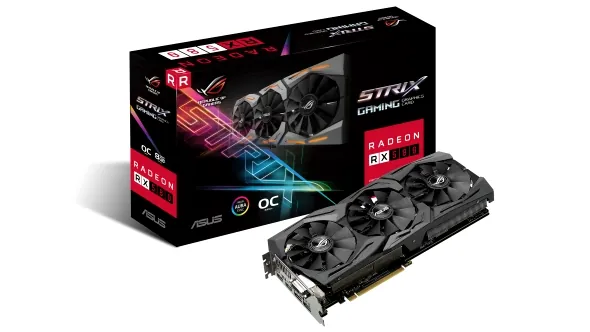
Step 1: The Definitive Driver Selection Strategy
- Latest Adrenalin (WHQL 25.8.1): This is the primary driver for all current AAA titles, ensuring optimal FSR 2.0 compatibility and utilizing the most recent performance tweaks. Installing this requires an up-to-date operating system (Windows 10/11) to function correctly.
- Stable Legacy (WHQL 22.6.1): This highly stable 2022 release should be kept on hand. If you encounter inexplicable stability issues, crashes, or performance regressions in older or highly modded titles, rolling back to 22.6.1 is often the immediate fix for Polaris architecture.
- Radeon Pro Software: Content creators involved in professional workflows—such as CAD, video editing, or animation—must utilize the specialized Radeon Pro Software for Enterprise. This software prioritizes stability and security, and is rigorously tested against professional applications, offering a crucial stability advantage over the gaming-focused Adrenalin suite.
- Windows 7 End-of-Life: Be aware that Windows 7 64-bit support has officially moved to a legacy support model. No new driver releases for the RX 580 are planned for this OS, making an upgrade mandatory for continued security and performance optimizations.
Reality Check: 1440p/144Hz Dreams vs. RX 580 Reality
The allure of high-refresh 1440p gaming is a common emotional hotspot for budget builders, but data-driven reality is sobering: the RX 580 cannot achieve acceptable framerates at 1440p in modern AAA titles, even at 100Hz or 60Hz targets. Attempts to push QHD resolution will require dropping settings to ‘Low’ and accepting framerates that render high-refresh displays redundant. A monitor’s refresh rate is a cap, not a performance booster; if your GPU only outputs 50 FPS, a 144Hz monitor will still only show 50 unique frames. The RX 580 remains fundamentally a 1080p card.
Step 2: Mastering the Aggressive Compromise
- Prioritize CPU Optimization: In many modern, open-world titles, the RX 580 is GPU-bound only after the CPU has been heavily loaded. Focus on reducing CPU load first by dropping settings like Geometry Detail, Draw Distance, Crowd Density, and Physics quality. This frees up crucial milliseconds for the GPU.
- Target 60 FPS Minimum: The community sentiment is correct: ignore ‘High’ settings entirely. The goal is to set almost every setting to the lowest possible level (Low/Medium) until a consistent 60 FPS minimum is achieved. Only once this baseline is locked should you incrementally raise the most visually impactful settings, such as Textures (assuming you have the 8GB VRAM model).
- Utilize FSR 2.0 Performance Mode & Third-Party Upscalers: For demanding AAA releases, FSR 2.0 Performance mode (540p input) is not optional; it is the necessary compromise. Additionally, experiment with third-party tools like Lossless Scaling (LS1) for titles without native FSR support or where LS1’s detail preservation offers a superior visual trade-off for the performance gained.
- Linux Users: While Windows users chase FSR 2.0 fixes, Linux users can find stability by relying on forcing FSR 1.0 via Proton or Wine-GE for DirectX 11 and Vulkan titles. This reliable path to spatial upscaling provides a consistent performance boost without the temporal instability or DX12 runtime issues plaguing the RX 580 on Windows.
Debunking the Myth: Crossfire (Multi-GPU) in 2025
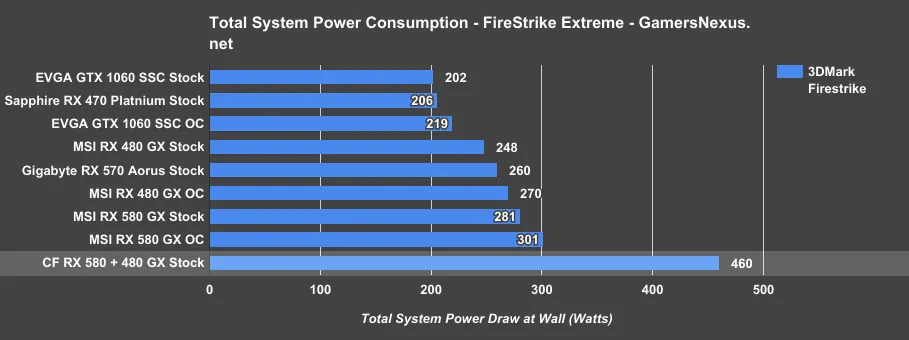
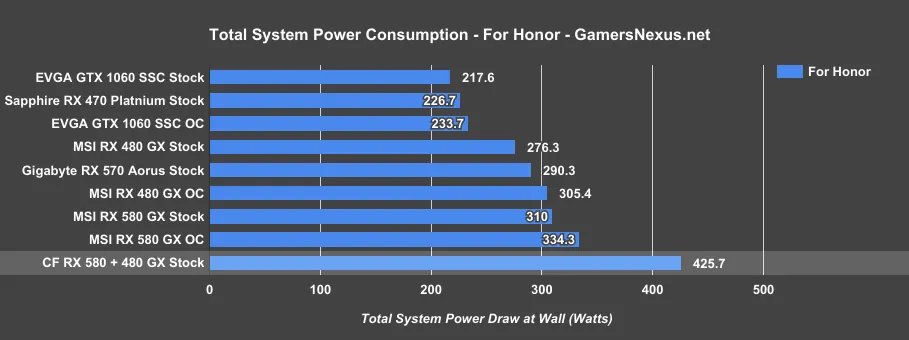
The prospect of pairing two budget champions to achieve high-end performance is a persistent dream for resourceful gamers. Historically, AMD Crossfire promised scaling that could rival more expensive single cards. However, in 2025, that promise has largely evaporated. Our analysis of legacy configurations reveals a stark reality: Crossfire is no longer a viable path to modern gaming. The technical hurdles, lack of driver support for modern APIs, and disproportionate power consumption far outweigh the fleeting gains seen in a handful of optimized titles.
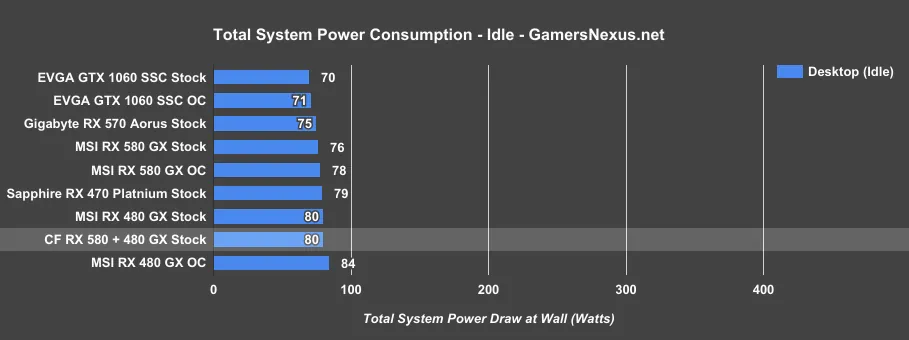
RX 580 Crossfire Power Consumption (System Total)
RX 580 Crossfire: A Reality Check
Pros
- Rare instances of near 2x scaling in very specific, legacy DX12 titles like Sniper Elite 4.
- Technically compatible with mixed RX 400/500 series cards (e.g., RX 580 + RX 480) due to identical architecture.
Cons
- Abysmal Game Support: Modern titles like Doom (Vulkan) and Ghost Recon: Wildlands show zero scaling or hard crashes.
- Inconsistent Scaling: Most supported games offer only 30-50% uplift, which degrades further at higher resolutions.
- Micro-Stuttering: Fierce frame-time inconsistency and micro-stuttering make even high-FPS results feel unplayable.
- Massive Power Draw: Peak system draw of 555W is double that of modern GPUs that offer triple the performance.
- Value Proposition: The cost of two RX 580s and a high-wattage PSU exceeds the price of a more stable single-GPU upgrade.
The RX 580 in 2025: A Practical Assessment
Pros
- Exceptional secondary market value and availability, making it ideal for entry-level or secondary systems.
- Full support for FSR 1.0/2.0 (when implemented correctly via Vulkan or mods), offering a necessary performance boost.
- Highly effective when paired with third-party upscalers like Lossless Scaling (LS1) for non-native titles.
- Excellent 1080p performance in older or less demanding esports titles.
- Low power draw for a single card compared to modern high-end cards, reducing overall system heat and PSU requirements.
Cons
- Lacks dedicated hardware acceleration for ray tracing, making modern lighting effects unplayable.
- DX12 runtime issues with FSR 2.0 on older Polaris silicon necessitates manual configuration or mods.
- Minimum performance uplift in demanding AAA games (e.g., Starfield) even at the lowest settings.
- Requires aggressive graphical compromises, often leading to a soft, blurry image quality to maintain 60 FPS.
- Unsuitable for 1440p or higher resolutions, even with upscaling, due to fundamental hardware limitations.
- Multi-GPU (Crossfire) setups are not recommended due to poor support, inconsistent scaling, and excessive power draw.
Frequently Asked Questions
While FSR 3 is software-based, the RX 580’s architecture lacks the headroom to handle the interpolation overhead. Frame Generation requires a high base framerate to avoid massive latency. Community mods like Optiscaler can force FSR 3 on Polaris, but expect significant artifacts and input lag, making it more of an academic experiment than a viable gaming solution.
The 8GB model is mandatory. Modern games at 1080p frequently exceed 4GB of VRAM even on Low settings. Insufficient VRAM leads to stuttering and asset pop-in. Furthermore, the extra VRAM is crucial for the frame buffers required by upscaling technologies like FSR and Lossless Scaling.
If your goal is uncompromised 1080p/60 FPS in new AAA releases, yes. However, if you are willing to use the ‘Optimization Playbook’—relying on FSR 2.0 Performance mode and third-party upscalers—the card can survive as a budget champion. Just be aware that multi-GPU setups are not a viable upgrade path.
Unequivocally no. Crossfire suffers from extremely poor modern game support, inconsistent scaling (often negative), and massive power consumption. Investing in a single, more powerful modern GPU will provide a more stable, consistent, and superior experience than any dual-RX 580 configuration.
Final Verdict
The RX 580’s run as a raw power champion is over. It has transitioned into a ‘software card’—a testament to the power of optimization. Its continued value depends on the user’s willingness to embrace FSR 2.0 and third-party solutions like Lossless Scaling as mandatory tools rather than optional perks. While 1080p can still be salvaged with meticulous tuning, users must abandon dreams of 1440p and completely dismiss the notion that multi-GPU Crossfire offers a shortcut to performance. The card still has fight left, but only for those dedicated to the optimization science required to keep it alive.