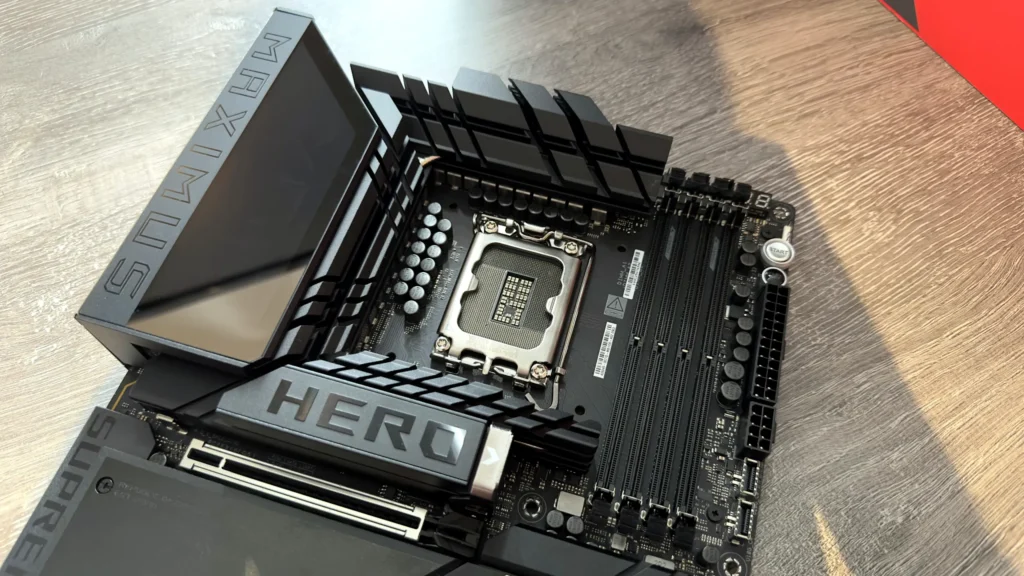
The ASRock X870 Nova WiFi offers an appealing feature set (5x M.2, 2x USB4) for its $280 price tag, but the specifications are misleading.
CRITICAL FLAW: The board suffers from severe PCIe lane sharing. Activating multiple M.2 slots or USB4 ports forces the primary GPU slot (PCIe 5.0 x16) to operate at half bandwidth (PCIe 5.0 x8), creating a clear bottleneck.
Real-world gaming performance is underwhelming, likely due to extremely conservative factory CPU and RAM settings implemented to guarantee stability.
The primary Gen5 M.2 slot’s cooling solution is inadequate, allowing high-speed NVMe SSDs to hit thermal throttling thresholds (78°C) under sustained load.
Verdict: The complex architectural limitations and high price make the Nova WiFi a poor value proposition, especially when compared to true X870E alternatives offering dedicated lanes.
The Promise: Five M.2 Slots and Dual USB4 Connectivity
ASRock’s X870 lineup aims to deliver high-end features to the demanding AM5 platform, and on paper, the Phantom Gaming X870 Nova WiFi, priced around $280, appears to be a connectivity powerhouse. It is engineered with a robust 18+2+1 phase 80A SPS VRM mounted on a premium 8-layer PCB—specifications that suggest readiness for the most demanding Ryzen 9 9000-series processors. The board further boasts dual PCIe Gen5 x4 NVMe M.2 slots and two high-speed USB4 ports. This spec sheet suggests a foundation ready for extreme storage expansion and future connectivity standards. However, as is often the case in hardware design, the true story of this motherboard is not in what it offers, but what critical bandwidth it sacrifices to offer it all at this price point.
ASRock Phantom Gaming X870 Nova WiFi Core Specifications
Chipset
AMD X870
VRM Design
18+2+1 Phase, 80A SPS
M.2 Slots (Total)
5 (2x Gen5 x4, 3x Gen4 x4)
Rear I/O
2x USB4 Type-C, Wi-Fi 7
Primary PCIe Slot
PCIe 5.0 x16 (Configurable)
Retail Price (Est.)
$280
The Hidden Cost: Deconstructing the Phantom Bottleneck
CRITICAL WARNING: The PCIe Lane Matrix
The X870 Nova WiFi is severely starved for PCIe lanes, a fundamental limitation of the standard X870 chipset compared to its ‘E’ counterpart. Activating specific high-speed features will instantly halve the bandwidth of others. For example, if you choose to utilize the bottom PCIe slot or populate multiple M.2 slots (especially M.2_3), the crucial primary GPU slot, which supports PCIe 5.0 x16, is automatically downgraded to PCIe 5.0 x8. This creates a clear and measurable bottleneck for current and future high-end graphics cards. This complex lane sharing mechanism makes the board’s advertised connectivity difficult to utilize simultaneously without compromising core graphics performance.
Diagram showing the ASRock X870 Nova WiFi motherboard with annotated labels detailing PCIe lane sharing configurations.
Key Lane Sharing Configurations
Primary GPU Slot (PCIe 5.0 x16): Downgrades to x8 if M.2_3 or USB4 ports are active.
USB4 Ports: Utilizing both ports limits total available lanes for storage and graphics.
This issue stems directly from the fundamental lane allocation architecture inherent to the X870 chipset. Unlike the premium X870E designation, the standard chipset relies heavily on multiplexing and sharing to achieve its impressive connectivity count. While ASRock’s VRM cooling is excellent—a hallmark of their design prowess, featuring a robust 80A SPS layout—the board’s performance ceiling is ultimately set by these internal bandwidth compromises, not by power delivery. Furthermore, our testing showed that while the board is ‘rock solid’ for basic use and stress testing, gaming performance was notably underwhelming. This suggests that ASRock implemented highly conservative factory CPU and RAM settings to ensure maximum platform stability, potentially masking the board’s true potential and further obscuring the underlying bandwidth issues.
Thermal Trade-offs: VRM Excellence, SSD Weakness
Pros
Excellent VRM Cooling: The robust 18+2+1 phase, 80A SPS design keeps power delivery stable and cool, even under heavy, sustained Ryzen 9 loading.
High Connectivity Count: Five total M.2 slots (two Gen5) and dual USB4 ports are impressive statistics on paper for a $280 board.
Poor Gen5 M.2 Cooling: The primary Gen5 slot heatsink is insufficient, allowing high-performance SSDs to hit critical throttling temperatures (78°C) under sustained data transfer.
Severe PCIe Lane Sharing: Utilizing basic features instantly halves the primary GPU bandwidth (x16 to x8), limiting high-end graphics potential.
High Price: At $280, the cost is too close to superior X870E models that offer dedicated, non-shared lanes for critical components.
“Great motherboard, I build my new gaming PC using it and love it, rock solid.”
This sentiment perfectly encapsulates the conflict. Users experience immediate, reliable operation, leading to high trust. What they do not realize is that the ‘rock solid’ stability is achieved by conservative settings and that the full potential of their high-end components (especially Gen5 GPUs and SSDs) is being throttled by the underlying architectural compromises they haven’t yet utilized.
The True Value: X870 Nova WiFi vs. X870E Alternatives
X870 Nova WiFi vs. Typical X870E Board
Criteria
X870 Nova WiFi
X870E Equivalent
Primary GPU Lane Configuration
PCIe 5.0 x16 (Downgrades to x8)
PCIe 5.0 x16 (Dedicated)
Dedicated Gen5 M.2 Slots
2 (Shared Lanes)
2-3 (Dedicated Lanes)
USB4 Lane Independence
Shared with M.2/PCIe
Dedicated
Price Point (Est.)
$280
$300 – $350
Final Verdict
The ASRock Phantom Gaming X870 Nova WiFi is a motherboard defined entirely by compromise. While its VRM design is undeniably excellent and its raw feature count is highly appealing, the critical issue of PCIe lane sharing creates a fundamental architectural limitation. The moment a user attempts to utilize the board’s advanced connectivity, such as populating multiple high-speed SSDs or connecting high-bandwidth USB4 devices, they are actively degrading the performance of their primary graphics card by forcing it down to x8 bandwidth. At $280, it is simply too expensive for a board with such crippling internal limitations. This product is only suitable for a highly niche user who genuinely needs five SSDs but runs an older, lower-spec GPU that is not affected by the x8 bottleneck. For the vast majority of enthusiasts building a high-end AM5 system, saving up the marginal difference for a true X870E board is the only path to dedicated Gen5 performance, guaranteed bandwidth, and genuine future-proofing.
Frequently Asked Questions (FAQ)
What is the difference between X870 and X870E?
The ‘E’ designation in X870E (Extreme) guarantees dedicated PCIe 5.0 lanes for both the primary GPU slot and at least one M.2 slot, ensuring absolutely no bandwidth sharing between these critical components. Standard X870 boards, like the Nova WiFi, often rely on complex lane sharing and multiplexing to achieve their connectivity count, which inevitably leads to the bottlenecks discussed when multiple high-speed devices are activated.
Will the PCIe 5.0 x8 bottleneck affect my gaming performance?
For most current high-end GPUs (e.g., RTX 4080/4090 or RX 7900 XTX), the performance loss when running at PCIe 5.0 x8 is minimal—often within the margin of error—especially at high resolutions like 4K. However, for future, more bandwidth-hungry Gen5 GPUs, or in scenarios where you are CPU-bound at lower resolutions (1080p/1440p), the bottleneck becomes a measurable limitation. More crucially, the degradation becomes pronounced if you are also running multiple Gen5 SSDs that are drawing on the same shared pool of CPU lanes.
LoadSyn Team
LoadSyn is an independent PC hardware and optimization blog dedicated to BS-free performance testing. Our benchmark methodologies are spearheaded by our lead creative directors, while our dedicated editorial team compiles the raw telemetry into the actionable guides you read here.