
The Quest for Speed: Unlocking Your NVMe’s Hidden Potential
For too long, Windows users have been unknowingly held back, their high-speed NVMe SSDs operating below their true potential. The culprit? An antiquated default driver, disk.sys, which bizarrely treats these modern storage powerhouses like legacy SCSI devices. Now, a game-changing native NVMe driver, nvmedisk.sys, initially developed for Windows Server 2025, has surfaced within Windows 11 25H2. The tantalizing promise is a significant performance uplift, but unlocking it demands a manual, high-stakes dive into the Windows Registry. This isn’t for the faint of heart: the path to staggering speed gains is fraught with the risk of system instability or even complete boot failure. At LoadSyn, we’re dissecting this power-user gamble, exploring its immense promise, the intricate process, and the perilous pitfalls that await the daring.
This article discusses advanced system modifications involving the Windows Registry. Proceeding with these changes carries a significant risk of data loss, system instability, or complete boot failure. LoadSyn.com strongly advises against attempting this unless you are an experienced power user, have thoroughly backed up your entire system (including a full system image), and understand how to recover from potential boot issues. We do not provide direct ‘how-to’ instructions for this risky procedure but rather contextual information.
The Microsoft Conundrum: Why Your NVMe Is Still Speaking SCSI
The heart of this performance bottleneck lies in a deeply ingrained Windows architectural choice. For far too long, despite the advent of NVMe as a cutting-edge, high-speed storage protocol, the default Windows driver, disk.sys, has been handling these devices with a rather outdated approach. This driver, which traces its lineage back to 2006, effectively routes all NVMe commands through a legacy SCSI miniport. While this design decision ensured broad compatibility across a vast array of storage hardware, it fundamentally prevented NVMe drives from fully leveraging their direct hardware access capabilities, essentially forcing them to speak an older, slower language. This inefficiency isn’t new; manufacturers like Samsung, Intel, and Solidigm previously developed their own proprietary NVMe drivers to circumvent Microsoft’s limitations, though these efforts often proved inconsistent or were eventually discontinued. The recent discovery of nvmedisk.sys within Windows 11 25H2 (and officially in Windows Server 2025) finally signals Microsoft’s move towards a native NVMe driver, promising to bypass this archaic SCSI emulation and unlock true, unhindered performance.
The Allure of Speed: Up to 45% Faster for Your Games?
The raw performance figures are undeniably compelling. Initial reports, notably from rigorous testing by outlets like Notebookcheck, reveal truly significant performance uplifts after successfully activating the native NVMe driver. Users have documented gains reaching up to a staggering 45% in sequential read operations, alongside substantial improvements in both sequential and random write performance. For our gaming audience, these aren’t just abstract benchmarks; they translate directly into tangible benefits. Imagine noticeably faster game loading screens, smoother asset streaming in the most demanding open-world titles, and a universally snappier, more responsive operating system. This represents a potentially “free” performance upgrade, breathing new life into even a high-end SSD. While the exact magnitude of these gains will naturally fluctuate based on your specific NVMe model and system configuration, the clear potential for a transformative upgrade is undeniable.

An embedded video showcasing a user testing the NVMe registry trick, providing a real-world perspective on the process and results.
The Manual Activation: A Power User’s Registry Dive
Activating the nvmedisk.sys driver on a Windows 11 client is far from a straightforward process; there’s no convenient toggle in Device Manager. Instead, this advanced modification demands a direct interaction with the Windows Registry. The core operation involves carefully adding specific DWORD values to a critical path: HKEY_LOCAL_MACHINE\SYSTEM\CurrentControlSet\Policies\Microsoft\FeatureManagement\Overrides. These values essentially function as hidden flags, enabling features that Microsoft has not yet exposed through standard user interfaces. While the community has developed PowerShell scripts and .reg files to simplify the procedure, the underlying action remains an unsupported, manual registry edit. To confirm successful activation, users must navigate to Device Manager. There, properly configured NVMe drives will appear under ‘Storage disks’ and report nvmedisk.sys as their driver, a clear departure from the default ‘Disk drives’ listing with disk.sys.
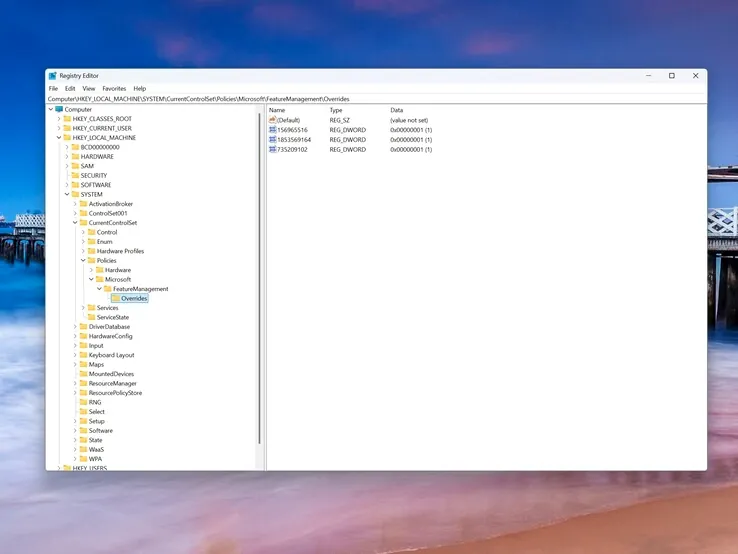
The Unforeseen Costs: Compatibility and Community Conflict
As with any advanced system modification, the pursuit of performance often introduces unforeseen trade-offs, and the nvmedisk.sys driver is no exception. Digging into community discussions reveals a significant emotional hotspot centered around compatibility. While a segment of users celebrates seamless, significant speed boosts, an equally vocal group has encountered severe issues. Notably, certain high-end NVMe SSDs, including specific Samsung 980 and 990 Pro models, have been reported to become incompatible, leading to frustrating performance degradation or even complete boot failures. Furthermore, a common complaint is the immediate breakage of manufacturer-specific monitoring and utility software, such as Samsung Magician or Western Digital Dashboard, which often lose the ability to recognize or properly manage the affected drive. This creates a clear dilemma: raw OS performance versus essential hardware management.
“Does not work with Samsung NVMe SSDs; I have two in one system. When you apply the fix, Samsung Magician no longer works properly and does not recognise the SSD anymore; I had to remove the fix.”
“In my testing it gave only a boost to my 4kq32t1 on read but tanked my write speed to 15 from 657, this was on my gaming drive my C drive had about 100 point boost in read and write but seeing that massive write drop on my gaming drive made me revert back…”
- Incompatibility Risks: The biggest unknown is hardware compatibility. While some drives flourish, others, particularly high-end models, may fail to boot or experience a significant drop in performance, making the “upgrade” a downgrade.
- Software Breakages: A common lament among users is the immediate loss of functionality for manufacturer-specific SSD utility tools like Samsung Magician, Crucial Storage Manager, or Western Digital Dashboard, which often cease to recognize the drive.
- Partition Changes: Some power users have reported that applying this registry tweak can alter disk IDs or partition structures, a subtle but potentially catastrophic change that could disrupt critical backup software or system recovery processes.
- Data Integrity: The most severe risk remains data corruption or complete boot failure. This is not a theoretical concern; it’s a very real possibility that necessitates an ironclad backup strategy before even considering this modification.
Microsoft’s Stance and the Future of Native NVMe
Microsoft has publicly reiterated its commitment to making Windows 11 “the best operating system for gaming,” outlining future improvements across background workload management, power and scheduling, graphics stack optimizations, and, notably, updated drivers. Yet, despite this broad pledge, specific official guidance or direct support for activating nvmedisk.sys on client Windows 11 installations remains conspicuously absent. While Microsoft did previously release the KB5007262 update to address general SSD performance issues tied to the NTFS USN journal, the nvmedisk.sys activation remains firmly in the realm of unofficial, community-driven endeavors. This leaves power users in a precarious state of ambivalence, forced to weigh the immediate, albeit unsupported, performance gains against the long-term promise of official stability and full compatibility.
Key Takeaways
- A hidden
nvmedisk.sysdriver in Windows 11 25H2 offers the potential for significant NVMe SSD performance boosts, with reports indicating gains up to 45%. - Enabling this driver requires manual, high-risk registry edits and is not officially supported by Microsoft for client Windows installations.
- Key risks include potential boot failure, data loss, and incompatibility with specific SSD models and their proprietary management software.
- A full system backup, including a system image, is an absolute prerequisite before attempting any such modifications.
- Community sentiment is sharply divided, with some users achieving major performance gains while others encounter severe system instability and functionality issues.
A High-Reward, Higher-Risk Proposition for the Daring
The nvmedisk.sys driver, in its current state, is a tantalizing window into the unoptimized potential lurking within Windows 11’s storage stack. For the truly seasoned power user – one who possesses a meticulously crafted backup strategy, a deep understanding of system recovery, and an unwavering willingness to troubleshoot – the reported performance gains could indeed be substantial, even game-changing. This kind of low-level tuning is precisely what enthusiasts crave. However, for the average user, or anyone without a bulletproof recovery plan, the inherent risks of system instability, potential data loss, and the breakage of essential manufacturer tools far outweigh the allure of an unofficial tweak. Our recommendation is clear: exercise extreme caution. It is far wiser to await official Microsoft integration of native NVMe support, or at the very least, for the community to establish a comprehensive, vetted compatibility list before venturing into these uncharted waters. This isn’t a casual upgrade; it’s a hack for the brave, not the faint of heart.
Frequently Asked Questions
Is it safe to enable the nvmedisk.sys driver?
What kind of performance gains can I expect?
Will this break my SSD manufacturer’s software (e.g., Samsung Magician)?
nvmedisk.sys. How do I revert the changes if something goes wrong?
Which Windows 11 versions support this driver?
nvmedisk.sys driver has been specifically identified and is reportedly activatable in Windows 11 version 25H2 and Windows Server 2025. It is generally not present or functional in older Windows 10 or earlier Windows 11 builds.