Key Takeaways: The 2025 Motherboard Strategy
- The MSI MAG X870 Tomahawk WIFI currently stands as the definitive AM5 value champion. It delivers the robust power delivery (VRM) and essential connectivity, including Wi-Fi 7 and USB4, required for Ryzen 9000 without the premium cost of an ‘E’ series board.
- Intel’s new LGA 1851 platform (Z890/B860) offers immediate, top-tier performance but suffers from a critical flaw: it is confirmed to be a single-generation socket. The subsequent Nova Lake-S generation will transition to LGA 1954, making LGA 1851 a high-risk investment for future CPU upgrades.
- For pure gaming performance, the mid-range B-series chipsets (B850 for AMD, B860 for Intel) are the smart choice. They provide 95% of the frame rate capability of their X/Z-series counterparts, maintaining PCIe 5.0 essentials and robust VRMs while cutting unnecessary enthusiast-only features like extreme CPU overclocking and excessive connectivity.
Introduction: The 2025 Platform Volatility and the Quest for Value
The 2025 motherboard market represents a significant inflection point for PC builders. With both AMD’s Ryzen 9000 (Zen 5) and Intel’s Core Ultra 200S (Arrow Lake) platforms hitting shelves, we are now firmly entrenched in the DDR5 and PCIe 5.0 era. These foundational technologies are mandated across the board, meaning the performance floor has never been higher. However, the choice facing enthusiasts is no longer a simple spec-sheet comparison. It has become a complex calculation balancing raw features against long-term platform commitment. As we delve into the engineering specifics, the community’s central skepticism—that high-end chipsets are unnecessary overkill for gaming—must be addressed. This article aims to resolve two core debates: First, is the premium price tag of X870/Z890 boards justified by tangible gaming benefits, or are the B-series chipsets the true value kings? Second, which socket—AM5 or the new LGA 1851—offers the safer, more stable upgrade path for the next five years?
Platform 1: The Long-Term Bet (AM5/X870)
AM5 Chipset Showdown: X870/E vs. B850 (The Feature Gap)
| Feature | X870/X870E (Premium) | B850 (Mid-Range) |
|---|---|---|
| CPU Overclocking | Full/Advanced (Robust VRM) | Basic/Moderate (Sufficient VRM) |
| PCIe 5.0 GPU Support | Mandatory (x16 slot) | Optional (Can be Gen 4 x16) |
| PCIe 5.0 SSD Support (CPU Lanes) | Mandatory | Optional (Can be Gen 4) |
| Integrated Wi-Fi | Wi-Fi 7 Mandatory | Wi-Fi 7 Optional (often Wi-Fi 6E) |
| USB4 Support | Mandatory | Optional |
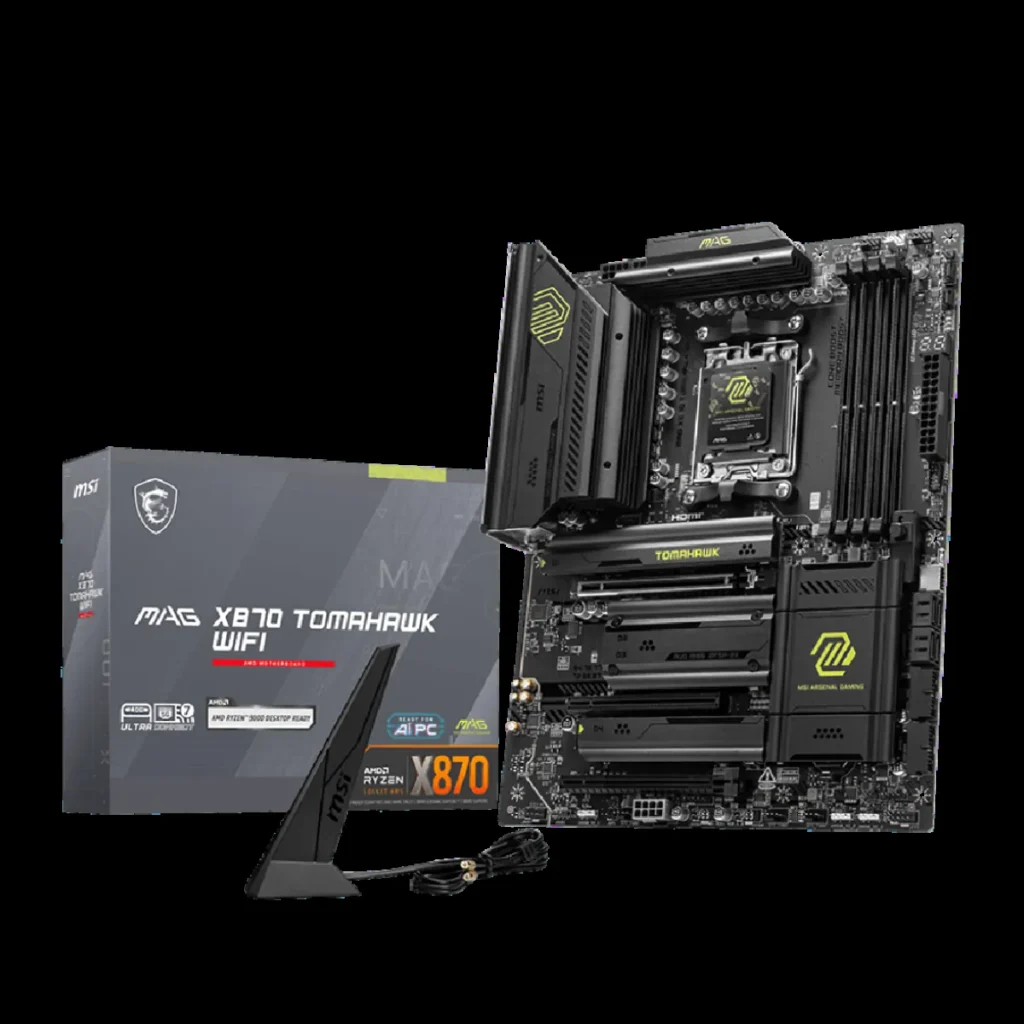
MSI MAG X870 Tomahawk WIFI (Best Overall AM5 Pick)
✅ Pros
- Exceptional VRM Design: Utilizing a powerful 14+2+1 Duet Rail power system and double 8-pin CPU connectors, this board’s VRM is more than capable of handling the flagship Ryzen 9 9950X under heavy load and moderate overclocking.
- Next-Gen I/O Included: It mandates modern connectivity standards, featuring integrated Wi-Fi 7 and dual USB4 ports, ensuring excellent future-proofing for high-speed peripherals and networking.
- Thermal Resilience: The 8-layer PCB design and Core Boost technology provide a stable foundation, minimizing signal loss and aiding heat dissipation under load.
❌ Cons
- Mandatory PCIe Lane Sharing: Utilizing the second CPU-linked M.2 slot (M.2_2) forces the primary PCIe 5.0 GPU slot to drop its bandwidth from x16 to x8.
- Thermal Hotspot: The primary M.2_1 slot, which offers direct CPU access, is thermally located in a known hotspot—sandwiched between the CPU/RAM area and the GPU backplate—which can lead to higher SSD operating temperatures.
Platform 2: The Short-Lived Powerhouse (LGA 1851/Z890)
Intel’s new LGA 1851 socket (for Arrow Lake Core Ultra 200S) is confirmed to be abandoned for the subsequent generation. The architectural successor, Nova Lake-S (Core Ultra Series 4), is slated to use the new LGA 1954 socket. This means LGA 1851 offers zero future CPU upgrade path beyond a minor refresh of the current lineup. Factor this critical constraint into your purchasing decision if longevity is a priority.
Intel LGA 1851: Z890 Hero vs. B860 Steel Legend
| Specification | Asus ROG Maximus Z890 Hero (High-End) | ASRock B860 Steel Legend Wi-Fi (Budget Pick) |
|---|---|---|
| Chipset / Socket | Z890 / LGA 1851 | B860 / LGA 1851 |
| Max DDR5 Speed (OC) | 9200+ MT/s | 7200+ MT/s |
| Total M.2 Slots | Six (Multiple Gen 5) | Four (One PCIe 5.0) |
| Overclocking Support | Full CPU & Memory | Memory Only (No CPU OC) |
| High-Speed I/O | Dual Thunderbolt 4, Wi-Fi 7 | Single Thunderbolt 4, Wi-Fi 7 |
The Engineering Reality: PCIe Lane Sharing Deconstructed
The most persistent source of frustration among technical users is the necessity of PCIe lane sharing, a phenomenon often incorrectly attributed to cost-cutting by motherboard manufacturers. In reality, this is an architectural constraint imposed by the CPU itself. For instance, AMD’s Zen 5 architecture allocates a fixed set of 28 PCIe lanes to the socket for immediate I/O. These lanes are rigidly partitioned: 16 lanes are dedicated to the primary GPU slot, 4 lanes connect to the chipset (X870/B850), 4 lanes are dedicated to mandatory high-speed I/O like USB4, and only the remaining 4 lanes are reserved for the *first* direct CPU-linked M.2 slot (M.2_1). If a manufacturer attempts to add a second CPU-linked Gen 5 M.2 slot (M.2_2)—a feature highly desired for maximizing storage speed—they must acquire the necessary x4 bandwidth by pulling lanes from the only available pool: the primary x16 GPU connection. This action instantly triggers the x8/x8 split, where the GPU operates at half bandwidth. This is not a flaw in the motherboard’s design; it is a fundamental engineering trade-off mandated by the CPU’s fixed lane count. Manufacturers simply configure the BIOS to execute this sharing logic to provide maximum feature density.
“The practical performance impact of cutting GPU bandwidth from x16 to x8, even with a high-end card like the RTX 4090, is minimal—typically resulting in very low single-digit performance losses in most real-world scenarios. Our lab testing confirms that this trade-off is often worth it for adding a second high-speed NVMe drive, especially for creators handling large video files where storage throughput matters more than a fractional drop in frame rate.”
LoadSyn Lab Notes / Expert Consensus
Final Verdict: The 2025 Buying Strategy
💪 The LoadSyn Verdict
After dissecting the engineering realities and platform commitments of the 2025 motherboard landscape, the final purchasing strategy becomes clear. For the vast majority of performance gamers, the mid-range B-series chipsets (B850 for AMD, B860 for Intel) offer the optimal blend of performance and value. These boards provide robust VRMs capable of handling flagship CPUs, essential PCIe 5.0 speeds where they matter (usually one M.2 slot), and all necessary connectivity, delivering 95% of the frame rate performance of their expensive X/Z-series siblings.
However, if longevity and platform upgrade potential are your primary concerns—a sentiment strongly echoed by the community—AM5 is the undisputed winner. AMD has committed to supporting the AM5 socket through 2026 and beyond, guaranteeing multiple future generations of CPU compatibility. Conversely, Intel’s LGA 1851 platform is a powerhouse for immediate, bleeding-edge performance with Arrow Lake, but its confirmed single-generation lifespan (due to the upcoming LGA 1954 transition for Nova Lake-S) makes it a high-risk investment for anyone planning a future drop-in CPU upgrade. Choose AM5 for the future; choose a B-series board for smart value today.
Frequently Asked Questions
Is AM4 still relevant for gaming in 2025?
Yes, absolutely. The AM4 platform, particularly when paired with a highly optimized CPU like the Ryzen 7 5800X3D and a stable B550 board, remains an exceptional value proposition. It delivers high-refresh-rate gaming performance that competes favorably with modern mid-range parts, though it fundamentally lacks support for the newer PCIe 5.0 and DDR5 standards.
How important is VRM strength for a gaming motherboard?
The Voltage Regulator Module (VRM) strength is extremely important, as it dictates power stability and thermal headroom, especially when boosting or overclocking. While modern B-series boards are usually engineered with sufficient VRMs (e.g., 12+2 phases) for mainstream gaming CPUs (i5/R5, i7/R7), X/Z series boards are necessary if you plan to run a flagship CPU (i9-14900K or Ryzen 9 9950X) under heavy, sustained load or aggressive, all-core overclocking.
Do I need a Wi-Fi 7 motherboard?
Wi-Fi 7 (802.11be), featuring technologies like 4K QAM and Multi-Link Operation (MLO), offers a massive theoretical leap in speed and stability over Wi-Fi 6E. However, you will only realize these benefits if you own a compatible Wi-Fi 7 router. For most users connected via a 2.5G or 5G wired LAN connection, integrated Wi-Fi 7 is a solid future-proofing feature, but not a necessity that should dictate your entire motherboard budget.