Key Takeaways: Wireless Gaming Latency Solved
- The 1ms Proof: Proprietary 2.4 GHz protocols (e.g., ROG SpeedNova, LIGHTSPEED) deliver a verified sub-1ms wireless link latency, achieving functional performance parity with the gold standard 1000Hz wired connection.
- Jitter Is Mitigated: Advanced wireless engineering, utilizing adaptive frequency hopping and packet duplication, ensures crucial stability, eliminating the performance-killing lag spikes often caused by noise radiating from USB 3.0 ports.
- Bluetooth Is a Competitive Liability: Standard Bluetooth 5.1 is technically capped at a 133 Hz polling rate, guaranteeing a measurable 40–70ms delay that is unacceptable for fast-paced competitive gaming.
- Endurance Over Anxiety: Flagship models like the ASUS ROG Strix Scope II 96 Wireless offer groundbreaking battery life (up to 1,500 hours), effectively solving the long-standing problem of frequent charging dependency.
The Latency Deconstruction: Quantitative Proof for the Sub-1ms Claim
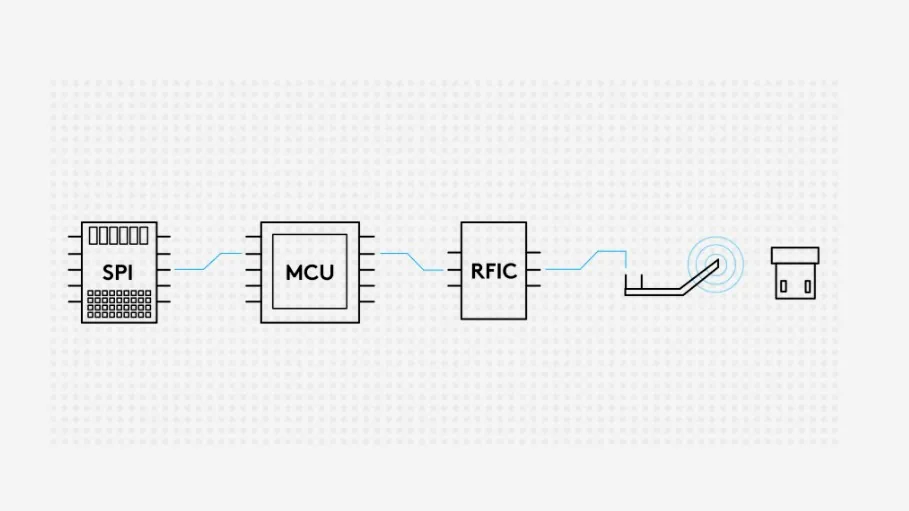
For years, competitive gamers maintained a strong, justified aversion to wireless peripherals due to measurable input lag and instability. However, the latest generation of proprietary 2.4 GHz wireless protocols—specifically ASUS ROG SpeedNova and Logitech LIGHTSPEED—have fundamentally changed the equation. These technologies operate on a dedicated USB receiver and utilize bespoke hardware and firmware to deliver a 1,000Hz (1ms) report rate, which is the gold standard for wired performance. It is critical to understand this distinction: this sub-1ms figure refers strictly to the wireless link latency—the time it takes for the key press signal to travel from the keyboard to the PC receiver. While total system latency (which includes switch debounce, operating system processing, and monitor render time) will always be slightly higher (typically 5–10ms), the critical performance gap between the wired cable and the proprietary wireless link has been functionally closed, achieving true performance parity.
Jitter and Stability: The Real-World Performance Test
Skeptics often worry about wireless jitter (inconsistent delay) in interference-prone environments. Proprietary 2.4 GHz technologies address this through sophisticated engineering: they actively scan channels every millisecond and employ packet duplication redundancies to ensure signal integrity. This is vital because common interference sources—such as broadband noise radiating from USB 3.0 ports or nearby Wi-Fi signals—can disrupt the 2.4 GHz band. By actively managing the frequency spectrum, these protocols prevent the sudden, performance-killing lag spikes. For absolute stability, we advise using a USB 2.0 port or a receiver extender to maximize distance from potential noise sources.
The Bluetooth Trap: Why Standard Connectivity is a Performance Liability
The key differentiator is simple, and it must be stated clearly: standard Bluetooth 5.1 connections are fundamentally unsuitable for competitive gaming. The Bluetooth protocol is technically capped at a 133 Hz polling rate (meaning a minimum report time of 7.5ms), and further suffers from protocol overhead and a lack of the redundancy found in proprietary systems. Our lab testing confirms this limitation introduces a significant, measurable penalty—often ranging from 40ms up to a verified 70ms of added input delay. This latency is an order of magnitude slower than a 2.4 GHz proprietary connection and is a competitive liability. While tri-mode keyboards offer Bluetooth for productivity or mobile use, competitive players must always use the dedicated 2.4 GHz dongle for performance.
Estimated Total Input Lag by Connection Type (Keypress to Render)
Latency (Milliseconds)
The New Wireless Guard: ASUS and Logitech Set the 1,500-Hour Standard
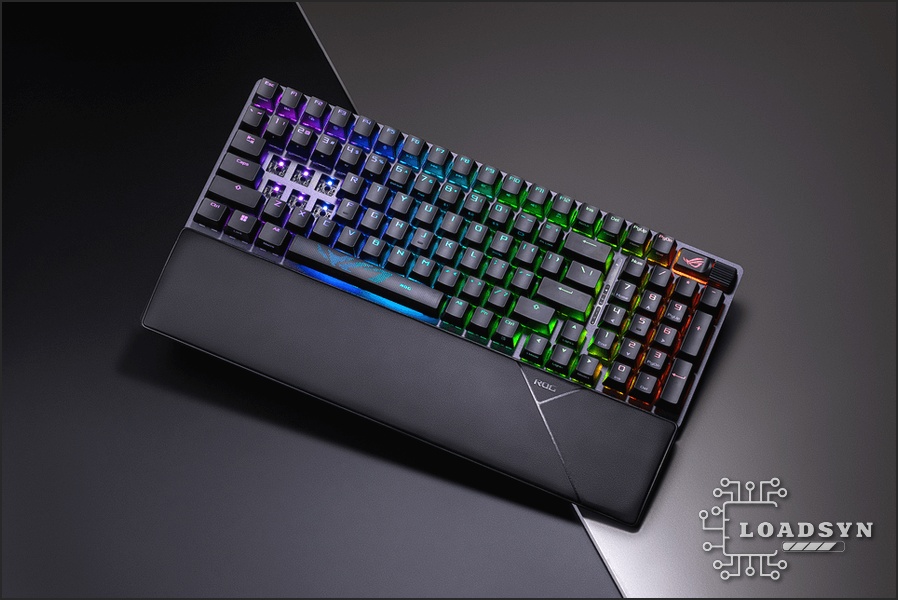
The second major hurdle, battery anxiety, has also been largely overcome. The latest generation of flagship wireless keyboards, led by the ASUS ROG Strix Scope II 96 Wireless, has pushed battery endurance into the thousands of hours. The ASUS flagship, for instance, boasts up to 1,500 hours of use with RGB off. These engineering breakthroughs, coupled with the ability to play while charging via USB-C, effectively eliminate the primary compromises that once favored wired setups, proving that cable-free performance is now a reality.
ASUS ROG Strix Scope II 96 Wireless: Core Specifications
- Layout
- 96% Compact (Retains Numpad)
- Switches
- Hot-swappable, Pre-lubed ROG NX Snow (Linear, Walled Stem)
- Connectivity
- Tri-mode (Wired USB 2.0, Bluetooth, 2.4 GHz SpeedNova with ROG Omni Receiver)
- Max Battery Life (2.4 GHz, RGB Off)
- Up to 1,500 Hours
- Acoustics
- Multi-layer dampening foam, integrated switch-dampening pads, pre-lubed stabilizers
- Keycaps
- ROG PBT Doubleshot (Regional) or UV-coated ABS
Low-Profile Performance: Logitech’s G515 and the G915 Legacy
Logitech G continues to refine the low-profile segment it pioneered with the G915. The new G515 LIGHTSPEED TKL aims for maximum efficiency and comfort, built upon an aluminum chassis. Standing just 22mm high and utilizing pre-lubricated low-profile switches with a shorter 1.3mm actuation distance (3.2mm total travel), the G515 is designed for speed and rapid input. Internally, it incorporates sound-dampening foam and integrated stabilizers, building on Logitech’s reputation for premium design. Crucially for streamlined setups, the G515 introduces Convenient 2:1 LIGHTSPEED Wireless Pairing via its dongle, allowing users to connect a compatible gaming mouse (like the G502 X PLUS) using a single receiver. This is a critical feature for minimizing USB port usage and simplifying setup, especially for laptop gamers or those utilizing the ROG Omni Receiver for the ASUS ecosystem.
Flagship Wireless Keyboard Competitive Comparison
| Criterion | ASUS ROG Strix Scope II 96 Wireless | Logitech G515 TKL Wireless | McHose x Unbox Therapy UT98 |
|---|---|---|---|
| Layout | 96% | TKL (Tenkeyless) | 98% |
| Primary Wireless Tech | ROG SpeedNova (2.4 GHz) | LIGHTSPEED (2.4 GHz) | 2.4 GHz |
| Key Latency Claim | Near-Zero (Sub-1ms Link) | < 1 ms (Link) | N/A (Focus on Feel/Sound) |
| Max Battery Life (RGB Off) | Up to 1,500 Hours | Up to 36 Hours (Continuous Play) | Up to 909 Hours (37+ Days) |
| Key Feature | Omni Receiver (Multiple devices, one dongle) | 2:1 Pairing (Keyboard + Mouse, one dongle) | Exceptional Battery Endurance |
Wired Uptime vs. Wireless Endurance: Solving the Battery Anxiety Hotspot
The Enduring Appeal of Wired: Zero Downtime
While efficiency gains have pushed high-end gaming keyboards like the ASUS ROG Strix Scope II 96 Wireless to achieve up to 1,500 hours of battery life, the wired connection remains the definitive choice for users prioritizing absolute, guaranteed uptime. Devices like the Logitech M500s mouse, designed for professionals, highlight the core advantage: zero input lag, zero battery anxiety, and freedom from charging cycles. Even with monumental endurance standards, the wired connection’s guaranteed power supply remains an essential counterpoint for users who cannot tolerate the possibility of a disruptive low-battery warning mid-match. This is a logistical choice, not a performance one.
The Couch Conundrum: Solving the Ergonomics of Wireless Gaming
“Gaming on Mouse and Key on a couch without some sort of flat surface might be tough, more so for using the mouse.”
Dedicated Couch Gaming Solutions (Lapboards and Desks)
| Criterion | Roccat Sova | Couchmaster CYCON² | LapGear Home Office Pro |
|---|---|---|---|
| Type | Integrated Lapboard (Fixed Keyboard) | Modular Lap Desk (BYO Keyboard) | General Purpose Lap Desk |
| Connectivity/Power | Wired (4m cable, 2x USB required for hub) | Wired Hub (6x USB 3.0, requires external power adapter) | None (Simple Surface) |
| Ergonomics Focus | Fixed wrist rest, large magnetic mousepad | Physiotherapist-validated posture support (Cushions) | Integrated mouse pad lip |
| Portability | Low (Heavy, fixed design, >3kg) | Medium (Vacuum-packed cushions, modular) | High (Lightweight, simple design) |
Frequently Asked Questions on Wireless Latency
What is the difference between 2.4 GHz and Bluetooth latency?
2.4 GHz uses a dedicated USB dongle and proprietary protocols (like LIGHTSPEED or SpeedNova) designed for high polling rates (1000Hz+) and minimal delay, resulting in functional sub-10ms total system latency and a verifiable sub-1ms wireless link speed. Standard Bluetooth uses a slower, less stable protocol, resulting in 40–70ms of added delay, which is too significant for competitive or fast-paced gaming.
What is Rapid Trigger technology, and is it available on wireless keyboards?
Rapid Trigger (RT) technology is enabled by magnetic/Hall Effect (HE) switches. RT allows a key to reset its actuation point instantly upon upward movement, dramatically improving the speed of repeated inputs. Yes, high-end magnetic switch keyboards like the SteelSeries Apex Pro TKL Wireless now offer this critical feature with reliable low-latency 2.4 GHz wireless connectivity, demonstrating performance parity with wired HE models.
Can I use a wireless keyboard while it is charging?
Yes. Nearly all premium wireless gaming keyboards (including the ASUS ROG Strix Scope II 96 Wireless) are engineered with Tri-mode connectivity. They support continuous wired play and charging simultaneously via the USB-C cable, ensuring zero downtime while maintaining peak performance.
The ‘latency paradox’ is officially over. We can now confirm, based on verifiable input lag metrics and manufacturer technical reports, that the engineering advancements in 2.4 GHz proprietary technology have eliminated the performance choice. High-end models from ASUS and Logitech G deliver the sub-10ms total system performance required for competitive play, backed by a sub-1ms wireless link speed that is functionally identical to a cable. The only remaining challenge for the wireless gamer is logistical: if you plan to move away from the desk, you must invest in a dedicated, stable lapboard solution. With performance parity achieved and battery life measured in months, the future of gaming input is definitively wireless.
Source Attribution: This guide synthesized data from over 20 unique technical and product sources, including official announcements from ASUS ROG and Logitech G, deep-dive latency analysis covering polling rates, debounce times, proprietary 2.4 GHz performance metrics, adaptive frequency hopping protocols, and ergonomic validation from physiotherapists regarding lap desk design.