
Key Takeaways
- The ProArt P16 is ASUS’s flagship creative workstation, featuring the AMD Ryzen AI 9 HX 370 and the NVIDIA GeForce RTX 5090 Laptop GPU (24GB VRAM).
- Its main selling point is the 16-inch 4K 120Hz ASUS Lumina Pro OLED display, factory-calibrated to Delta E < 1 and hitting 1,600 nits peak brightness.
- Pricing is aggressive at $3,999.99, putting it in direct competition with high-end MacBook Pro configurations and high-TGP gaming laptops.
- Community reaction is highly polarized, focusing on the high cost, the necessity of buying the 5090 model for 120Hz refresh rates, and severe frustration over poor US market availability.
For years, the professional creative space has been dominated by a single, highly efficient competitor. Now, ASUS is launching its most direct, no-holds-barred challenge yet: the ProArt P16. This isn’t just a powerful laptop; it’s a statement. By combining the raw processing muscle of the AMD Ryzen AI 9 HX 370 with the top-tier 24GB NVIDIA RTX 5090 Laptop GPU, ASUS is demanding a seat at the workstation table. But the P16’s $4,000 price tag, coupled with significant launch friction and a polarized user base, raises a crucial question: is raw power enough to unseat the king of creative stability?
The Engine Room: Unrivaled Specs and the 50 TOPS NPU
ASUS ProArt P16 (H7606WX-XH99T) Core Specifications
- Processor
- AMD Ryzen AI 9 HX 370 (12 Cores, 5.1 GHz, 50 TOPS NPU)
- Graphics
- NVIDIA GeForce RTX 5090 Laptop GPU (24GB GDDR7 VRAM)
- Display
- 16-inch ASUS Lumina Pro OLED, 4K (3840×2400), 120Hz VRR, 1600 nits peak
- Memory/Storage
- 64GB LPDDR5X RAM / 4TB M.2 NVMe PCIe 4.0 SSD (2x 2TB)
- Connectivity
- WiFi 7, USB4, HDMI 2.1 FRL, SD Express 7.0
- Dimensions/Weight
- 0.59-0.68 inches thick / 4.30 lbs
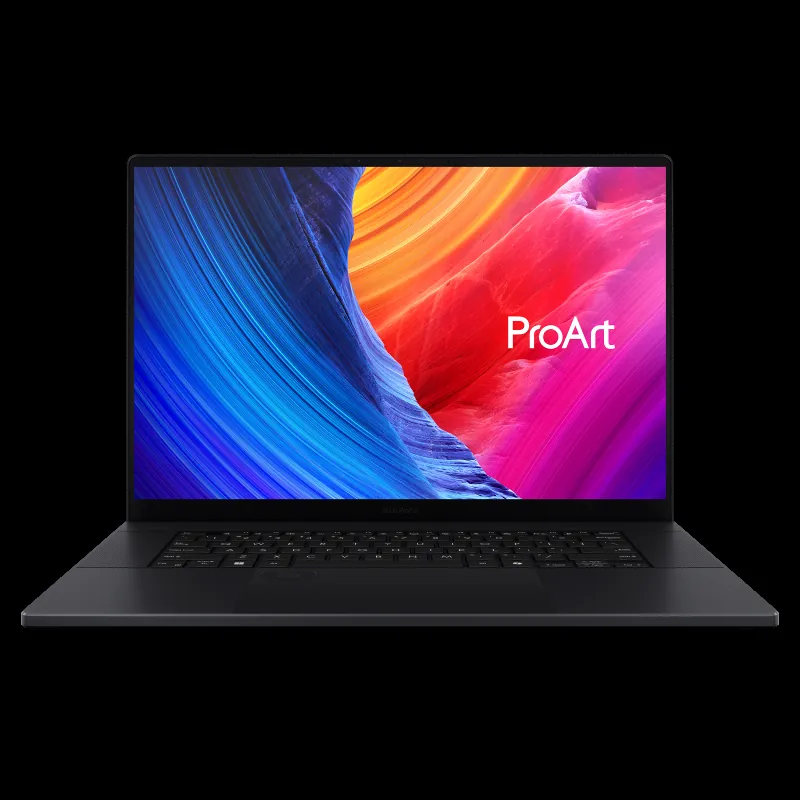
The inclusion of the RTX 5090 with 24GB of VRAM is not just for gaming; it’s a necessity for high-end rendering and multi-track 8K video editing where the M-series often struggles with raw throughput. This massive VRAM pool ensures stability during complex 3D scenes and demanding AI model training. Crucially, the P16 is a designated Copilot+ PC, meaning the combined power of the 50 TOPS AMD NPU and the RTX AI acceleration is optimized for Microsoft’s new suite of local AI tools. For LoadSyn readers, this translates to faster AI upscaling, quicker effects processing in Premiere Pro, and the ability to run applications like MuseTree for rapid image generation without cloud latency. Furthermore, the 1,600-nit peak brightness paired with the Delta E < 1 factory calibration means color grading in HDR environments is finally viable on a Windows mobile workstation.
The Creator’s Dilemma: Price, Polish, and the Mac Question
That 60 Hz refresh rate is a SIN !!!!! You have to go all the way to a 5090 for 120 Hz someone tell Asus that it’s 2025 lol. Also, I can’t find a ‘buy now’-button… anywhere.
The P16 Trade-Offs
Pros ✓
- Unmatched Raw GPU Power (RTX 5090 24GB) for 3D and 8K workflows.
- Industry-Leading 4K 120Hz OLED Display (1600 nits, Delta E < 1).
- Robust I/O, including high-speed SD Express 7.0 and USB4.
- Exclusive Creator Software Bundles (Adobe Creative Cloud Pro, GoPro Subscription).
Cons ✗
- High Barrier to Entry ($3,999.99 starting price).
- Launch Friction and Severe US Market Availability Issues.
- Community skepticism regarding Windows stability vs. macOS efficiency.
- Performance tiering that forces the 5090 model for the 120Hz display.
Unique Angle: The GoPro Cloud Integration
StoryCube: AI-Powered Action Cam Workflow
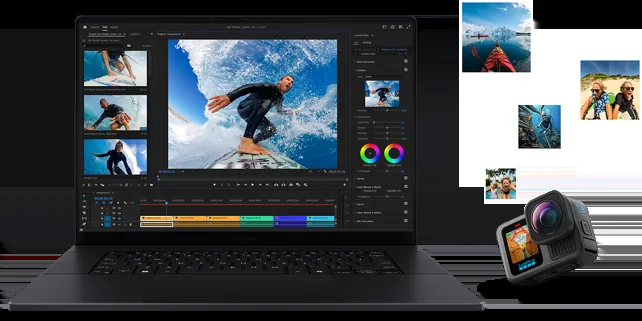
ASUS has secured a critical partnership with GoPro, offering ProArt users an extended six-month subscription to GoPro Premium+. More importantly, the exclusive StoryCube application is the first Windows app to integrate directly with GoPro Cloud. This AI-powered asset manager automatically tags and categorizes 360° footage by activity and location, allowing creators to seamlessly drag-and-drop highly organized clips into Premiere Pro or CapCut. This deep integration dramatically streamlines the workflow for action videographers and documentary makers, offering a compelling, specialized reason to choose the P16 over generic mobile workstations.
Final Verdict
The ASUS ProArt P16 is arguably the most technically capable Windows creator laptop ever made, delivering the raw processing power and the reference-grade display necessary to compete with the MacBook Pro 16. It is a technical triumph, but its market execution is currently a disaster. The $4,000 price point is only justifiable if ASUS can immediately solve the crippling availability issues and if the Windows Copilot+ ecosystem proves stable enough to handle professional, multi-day workflows without the driver chaos that drove many creators to Apple in the first place. If these issues are resolved, the P16 is the true Windows challenger. Until then, it remains a magnificent, but elusive, phantom.