
The Epic Divide: Unreal Engine 5, Performance, and the Blame Game
Unreal Engine 5 has rapidly become the industry’s engine of choice for visually stunning titles, yet its adoption has been met with a chorus of frustration from the PC gaming community. Players consistently report a litany of performance woes: persistent stuttering, erratic frame rates, and hardware demands that push even high-end rigs to their limits. This widespread struggle has fostered a growing perception that UE5, despite its cutting-edge features, is inherently unoptimized, leading to a palpable sense of exasperation among those simply trying to enjoy their games.
“The primary reason why Unreal Engine 5-based games don’t run smoothly on certain PCs or GPUs is the development process.”

The Gamer’s Lament: Community Frustration and the “Optimization is a Lost Art” Narrative
- Frustration & Desperation: “I literally had to get a new computer for UE5 to run… I actually think all the new features in UE5 are great, but really, you want them to be OFF unless you want them to be ON (not the other way around)”
- Worry & Pragmatism: “Optimization is a lost art these days and I too hope it comes back. I’m hoping the new TR games will be on the side of UE5 games that are decently optimized for average systems instead of just pushing everything to the max and praying it runs for people with big GPU money.”
- Confusion & Curiosity: “Curious, why is DX11 better than DX12 if its older?”

The Power Behind the Problem: Unreal Engine 5’s Core Technologies
At the heart of Unreal Engine 5’s visual prowess, and indeed its performance demands, lie three foundational technologies: Nanite, Lumen, and Virtual Shadow Maps. Nanite, the virtualized micropolygon geometry system, revolutionized asset fidelity by allowing developers to import film-quality assets with billions of polygons directly into their games. It dynamically scales the level of detail based on factors like draw distance and screen resolution, eliminating the need for manual LOD creation. However, this revolutionary approach, initially limited to static meshes, necessitates high-speed solid-state storage to stream massive amounts of geometric data into memory in real-time, meaning slower drives become a significant bottleneck.
Lumen, UE5’s dynamic global illumination and reflections system, delivers breathtaking real-time lighting that reacts instantly to scene and light changes, negating the need for pre-baked lightmaps. It supports both software ray tracing (optimized for broader compatibility at lower fidelity) and hardware-accelerated ray tracing (for maximum accuracy). While visually stunning, Lumen’s constant, real-time recalculation of light bounces and reflections is incredibly computationally intensive, placing immense strain on both CPU and GPU. Complementing these, Virtual Shadow Maps provide consistent, high-resolution shadowing for vast, dynamically lit open worlds. Unlike traditional shadow maps, VSMs virtually eliminate artifacts like shadow cascade and pop-in, but this granular, detailed shadowing comes at the cost of increased memory usage and rendering overhead.
Unreal Engine 5 System Requirements (Epic Games Recommended)
| Component | Minimum (Windows) | Recommended (Windows) |
|---|---|---|
| Operating System | Windows 10 64-bit | Windows 10 64-bit (Version 20H2) |
| Processor | Quad-core Intel or AMD 2.5 GHz or superior | Six-Core Xeon E5-2643 @ 3.4GHz (or Intel Core i5-12600K+, AMD Ryzen 5 5600X+) |
| Memory | 8GB RAM | 64 GB RAM |
| Graphics Card | Any DirectX 11 or 12 compatible card | NVIDIA GeForce RTX 2080 SUPER |
| Storage | N/A | 256 GB SSD (Internal), 2TB SSD (External) |


Sweeney’s Stance: The Development Process, Not the Engine
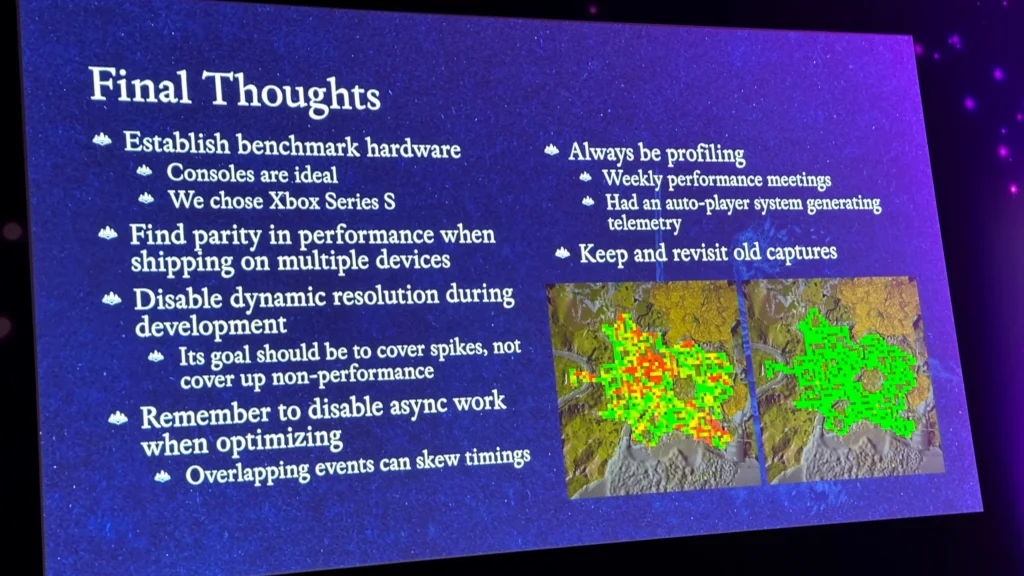
Epic Games CEO Tim Sweeney has been unequivocal in his assessment, redirecting the spotlight from the engine itself to the methodologies employed by game studios. His core critique centers on a prevalent development pipeline: many studios initiate game creation by targeting the most powerful, high-end hardware. This initial focus often leads to a deferment of optimization and testing for lower-spec devices until the very final stages of development. Sweeney argues that this “order of the development process” is fundamentally flawed. In an ideal world, he suggests, optimization should not be an afterthought but an integral part of the development lifecycle, ideally commencing even before full-scale content production begins. Delaying this crucial step, he contends, inevitably leads to the performance issues that plague many UE5 titles upon release.
“Of course, optimization is by no means an easy task. It’s a very difficult one. Ideally, optimization should be implemented early in development, before full-scale content building begins.”
The Console Conundrum: PC Optimization Challenges
The Lifespan of an Engine: Why Developers Stick to Older UE Versions
The perception that developers are simply “lazy” for not adopting the latest Unreal Engine 5 iteration immediately upon release is a common misconception. In reality, the lengthy development cycles inherent to AAA game production often necessitate committing to a stable engine version early in the project. For instance, Stalker 2 launched on Unreal Engine 5.1, while Avowed utilized UE 5.3. Upgrading a game engine mid-project, particularly one as complex as Unreal Engine, is far from a trivial undertaking. It introduces substantial risks of instability, demands significant re-work to adapt existing code and assets to new features, and incurs considerable time and cost. Even if newer engine versions offer performance optimizations, the disruption caused by an upgrade often outweighs the potential benefits for a project already deep in development, making stability a higher priority than always chasing the bleeding edge.

The Community’s Workarounds: Stripping Down UE5 for Performance
Many users are finding significant FPS gains by forcing Unreal Engine 5 games or even the editor to run in DirectX 11 mode, sometimes doubling their framerate. This temporary relief, however, raises questions about the efficiency of DX12 implementations and the default reliance on resource-heavy UE5 features like Lumen and Nanite. Why does older tech sometimes outperform the new?
Epic’s Counter-Measures: A Collaborative Path to Optimization
- Automated Optimization Features: Epic aims to integrate more automated tools within UE5 to streamline optimization across diverse hardware platforms, reducing manual effort for developers.
- Enhanced Developer Education: Epic plans to provide more training materials and emphasize the importance of starting optimization early in the development cycle, offering direct technical support from their engineers when needed.
Unreal Engine 5 is undeniably a powerhouse, pushing graphical boundaries with features like Nanite and Lumen. However, our analysis, supported by Tim Sweeney’s insights and community feedback, points to a complex truth: while the engine’s advanced capabilities set a high bar, the prevalent performance issues are largely a result of developer practices. The industry’s tendency to optimize late in the cycle, target high-end hardware first, and the practical challenges of updating engine versions all contribute to the problem. The path forward demands a collaborative shift: Epic providing more robust automated tools and enhanced education, and developers adopting a ‘performance-first’ mindset from day one. Only then can the true potential of UE5 be consistently realized across the diverse PC gaming landscape.