
Key Takeaways
Valve is officially broadening SteamOS support to encompass third-party handhelds, kicking off with a licensed version for the Lenovo Legion Go S and a public beta for other AMD-based devices. SteamOS 3.7 brings crucial improvements for devices like the ROG Ally and original Legion Go, making DIY installation a viable option for tech-savvy enthusiasts. While the community is largely enthusiastic about the promise of an optimized SteamOS experience, there are significant concerns over persistent software bugs (such as brightness and Wi-Fi issues) and a strong demand for full feature compatibility, including HDR and VRR. This strategic expansion underscores Valve’s long-term ambition for SteamOS to become a standardized, cross-platform gaming OS, potentially reigniting the ‘Steam Machine’ concept across various form factors.
The Handheld Revolution: SteamOS Breaks Free
For years, the Steam Deck has been the sole torchbearer of Valve’s custom Linux-based operating system, SteamOS. Praised for its optimized gaming experience and seamless integration with the Steam ecosystem, it offered a compelling alternative to the often-clunky Windows on handhelds. But a new era is dawning. Valve has officially announced its boldest move yet: SteamOS is breaking free from the confines of the Deck, set to power a new generation of third-party handheld PCs, with a beta available for DIY installations on a wider array of AMD hardware. This isn’t just an update; it’s a strategic shift that promises to redefine the handheld gaming landscape by offering a more unified and optimized software experience across diverse hardware.
Valve’s Ambitious Vision: One OS to Rule Them All?
Valve’s ambition for SteamOS has always been grander than a single device. The original Steam Machines, though ultimately unsuccessful, hinted at a future where SteamOS could be a ubiquitous gaming platform. With the Steam Deck, Valve built a stronger foundation, solving the Linux game compatibility problem first. Now, they’re leveraging that success, aiming to standardize the handheld PC experience. By allowing other manufacturers to license SteamOS and providing a public beta for installation, Valve seeks to create a unified platform where hardware diversity meets software optimization, ensuring that the ‘Steam Deck experience’ is no longer exclusive to Valve’s own hardware. This strategic play could position SteamOS as a formidable contender in the broader gaming OS market, moving beyond just portable devices.
“It’s a great community project that delivers a lot of value to people that want a similar experience on devices right now… In a lot of ways Bazzite is a good way to kind of get the latest and greatest of what we’ve been working on, and test it.”
— Pierre-Loup Griffais, Steam Deck Co-designer

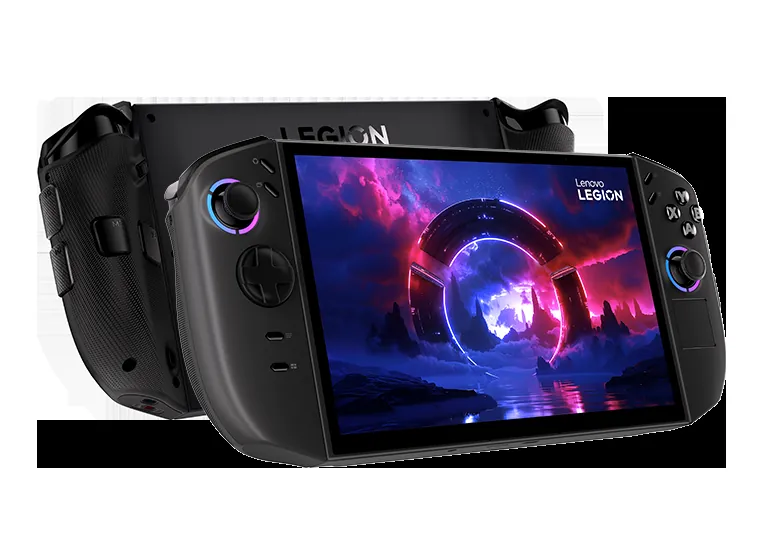
The Trailblazer: Lenovo Legion Go S – Powered by SteamOS
Lenovo has stepped up as the first official partner, unveiling the Legion Go S ‘Powered by SteamOS’ at CES 2025. This dedicated SteamOS variant is slated to ship in May, offering a streamlined, optimized experience right out of the box, in stark contrast to its Windows 11 counterparts. While the Windows versions boast more RAM and storage at a higher price point, the SteamOS model focuses on an accessible, console-like plug-and-play experience. It leverages Valve’s software optimizations and pre-compiled shaders, which are crucial for achieving smoother gameplay and better battery life. This commitment from a major manufacturer like Lenovo is a clear signal that the industry sees significant value in a dedicated gaming OS for their handhelds, moving away from the general-purpose nature of Windows.
Lenovo Legion Go S vs. Steam Deck OLED (Key Specs)
| Feature | Legion Go S (SteamOS) | Legion Go S (Windows) | Steam Deck OLED |
|---|---|---|---|
| OS | SteamOS | Windows 11 | SteamOS |
| Processor | AMD Ryzen Z2 Go | AMD Ryzen Z2 Go | Custom AMD APU (6nm) |
| RAM | 16 GB | 32 GB / 16 GB | 16 GB LPDDR5 |
| Storage | 512 GB | 1 TB / 1 TB | 512 GB / 1 TB NVMe SSD |
| Display | 8.8″ 120 Hz PureSight OLED | 8.8″ 120 Hz PureSight OLED | 7.4″ 90 Hz HDR OLED |
| Battery | 55 Wh | 55 Wh | 50 Whr |
| Price (MSRP) | $499.99 | $729.99 / $599.99 | $549 / $649 |
SteamOS 3.7 & Beyond: Your DIY Installation Guide
Beyond official partnerships, Valve has made SteamOS 3.7 available as a public beta, significantly improving support for generic AMD-based PCs. This includes other popular handhelds like the Asus ROG Ally and the original Lenovo Legion Go, which were previously limited to community-driven Linux distributions like Bazzite for a Steam Deck-like experience. This means that if you own compatible hardware, you can now download and install a working copy of SteamOS yourself. This empowers users to take control of their handheld experience, potentially gaining the benefits of Valve’s optimized software and game compatibility without waiting for official ‘Powered by SteamOS’ devices, offering a fresh lease on life for existing hardware.
To install SteamOS 3.7 on your non-Steam Deck hardware, you MUST have AMD hardware (CPU, GPU, chipset) and an NVMe SSD. Additionally, you will need to DISABLE Secure Boot in your PC’s BIOS/UEFI settings. Without these, the installation will likely fail or lead to significant compatibility issues. Remember, dual-booting Windows and SteamOS is not officially supported and will require a fresh reinstallation of Windows to revert.
Step-by-Step: Installing SteamOS 3.7 on Compatible Handhelds
- Verify Hardware Compatibility: Ensure your device features an all-AMD CPU/GPU configuration and an NVMe SSD.
- Disable Secure Boot: Access your device’s BIOS/UEFI settings (often by pressing a specific key like Del, F2, F10 during startup) and disable ‘Secure Boot’. Consult your manufacturer’s documentation for exact steps.
- Download SteamOS Recovery Image: Obtain the latest SteamOS 3.7 recovery image from Valve’s official channels (or a trusted community source for the beta).
- Create a Bootable USB: Use a tool like Rufus (for Windows) or Balena Etcher (for macOS/Linux) to write the SteamOS recovery image to a USB drive (8GB or larger).
- Boot from USB: Insert the bootable USB into your handheld, restart, and select the USB drive as the boot device from your boot manager (often accessed via F12 or similar key).
- Follow On-Screen Prompts: The SteamOS installer will guide you through the process. Be aware that this will likely wipe your existing operating system and data.
- Post-Installation Configuration: After installation, SteamOS will boot into the familiar Steam Deck UI. You may need to manually update drivers or settings for optimal performance and peripheral recognition, especially for non-Steam Deck specific controls or features like Wi-Fi 6E.
Pros and Cons of DIY SteamOS Installation
Pros
- Optimized Gaming Experience: SteamOS is built for gaming, often providing smoother performance and better battery life.
- Seamless Steam Integration: Direct access to library, shader pre-caching, and Steam Input.
- Linux Benefits: Enhanced privacy and a robust open-source community.
- Cost-Effective Upgrade: Potentially revitalizes older Windows handhelds.
Cons
- Limited Hardware Support: Primarily optimized for AMD hardware; Intel/NVIDIA support is experimental.
- Driver & Feature Gaps: May lack support for Wi-Fi 6E, HDR, or VRR on certain panels.
- Installation Complexity: Requires technical proficiency to navigate BIOS and boot media.
- No Official Dual-Boot: No simple method for keeping Windows alongside SteamOS.
- Anti-Cheat Issues: Some online games with aggressive anti-cheat will not run.
The Fandom Speaks: Hopes, Hurdles, and Hardware Demands
The expansion of SteamOS has ignited a passionate response within the handheld PC community. There’s fierce optimism about pairing high-end hardware, like AMD’s Z2 Extreme chips, with Valve’s optimized software, anticipating a truly next-gen portable gaming experience. However, this excitement is heavily tempered by immediate and recurring technical roadblocks. Users are vocal about their frustrations with known software bugs, a growing concern over the increasing premium cost of new devices that deviates from the original affordable Steam Deck ethos, and a demand for full transparency on hardware feature compatibility, especially for premium display technologies.
Community’s Emotional Hotspots
- Frustration & Anticipation: Users are highly anticipating the official SteamOS release for better stability, believing it will finally iron out the kinks. Yet, they are frustrated by persistent, known software bugs (like brightness control and Wi-Fi) in current unofficial/beta installations.
- Excitement & Skepticism: There is strong enthusiasm for the potential of high-end Windows handhelds running the optimized SteamOS environment. However, this is met with deep skepticism about whether the premium pricing truly justifies the marginal performance gains.
- Disappointment & Demand: The community is demanding full disclosure on hardware feature compatibility, particularly for premium features like HDR and VRR, within SteamOS.
Advanced Considerations: HDR, VRR, and the Future of SteamOS
The journey of SteamOS beyond the Steam Deck is not without its technical complexities, especially when it comes to advanced display technologies. Issues such as unstable refresh rates when both VRR and HDR are enabled highlight the ongoing challenges. While SteamOS 3.5.5 brought initial HDR and VRR support for external displays, ensuring seamless integration across third-party hardware remains a significant task for Valve. Their commitment to a ‘single platform’ means continuous updates and close collaboration with partners will be crucial to delivering the full graphical fidelity these modern handhelds promise.
SteamOS 3.7 Key Updates (Highlights)
| Feature | Details |
|---|---|
| Linux Kernel | Version 6.11 (up from 6.5 in 3.6) |
| Arch Linux Base | Newer base for improved performance and updates |
| Desktop Mode | KDE Plasma interface version 6.2.5 |
| Graphics Drivers | Updated Mesa drivers with performance and feature improvements |
| HDR/VRR Support | Improved support for external displays and some USB-C adapters |
| Display Colors | Adjustable color intensity (‘Native’, ‘sRGB’, ‘Boosted’) |
| External Storage | Automatic mounting of external storage devices |
Looking ahead, Valve’s strategy hints at a broader ecosystem. Whispers of a new ‘Steam Machine’ living-room device, a redesigned Steam Controller, and even a ‘Steam Frame’ VR headset suggest that SteamOS could become the central nervous system for Valve’s entire hardware lineup. This ambitious vision positions SteamOS as a serious contender for a ‘go-to’ gaming operating system beyond just the portable realm.
The Dawn of a New SteamOS Era
Valve’s decision to expand SteamOS beyond the Steam Deck is a watershed moment for PC gaming handhelds. It promises a future where optimized, console-like gaming experiences aren’t tied to a single piece of hardware, but are accessible across a diverse range of devices. While initial adoption and DIY installations will undoubtedly come with technical teething problems, the long-term vision of a standardized, Valve-backed gaming OS is incredibly compelling.