
Quick-Fire Analysis: Cudy WR3600E at a Glance
- Budget-Friendly Wi-Fi 7: The Cudy WR3600E stands out as one of the most aggressively priced Wi-Fi 7 routers, frequently available for under $70. This makes it an exceptionally accessible entry point to the new wireless standard, a stark contrast to the premium pricing of early Wi-Fi 7 devices.
- Significant Performance & Port Compromises: Despite its Wi-Fi 7 designation, the router is severely hampered by limited Gigabit Ethernet ports (a single WAN, three LAN, and critically, no 2.5 GbE options). It also lacks a USB 3.0 port, curtailing network storage capabilities. Our testing shows generally weaker wireless performance and restricted coverage compared to slightly more expensive, yet still budget-friendly, alternatives.
- Basic Wi-Fi 7 Features: While it supports Multi-Link Operation (MLO), a cornerstone of Wi-Fi 7 for improved efficiency, the absence of the 6GHz band means it cannot deliver the full spectrum of Wi-Fi 7 benefits, such as wider, less congested channels and higher peak throughput, typically found in premium models.
- Intuitive Setup & Software: The device offers a commendably easy setup experience via both web browser and the dedicated Cudy app. The software suite includes practical features like decent parental controls and convenient remote management capabilities, enhancing user-friendliness.
- Better Alternatives Exist: For a marginal increase in investment (typically an additional $15-$30), options such as the TP-Link Archer BE3600 provide a vastly superior value proposition for gamers. These alternatives often feature essential upgrades like 2.5 GbE WAN/LAN ports and USB 3.0, coupled with demonstrably better overall wireless performance, delivering a stronger ‘bang for your buck’ for a future-proof gaming setup.
The Sub-$70 Wi-Fi 7 Enigma: Unpacking the Cudy WR3600E
Just a few years ago, Wi-Fi 7 routers were exotic beasts, sporting price tags upwards of $600. Today, the landscape has dramatically shifted, with dual-band Wi-Fi 7 options dipping below the $100 mark. Enter the Cudy WR3600E, a router aggressively priced under $70, promising next-generation wireless connectivity without breaking the bank. But for the discerning gamer, is this a true budget revolution, or are the compromises too significant to justify the cost savings? LoadSyn’s Technical Lab put the Cudy WR3600E through its paces to uncover the real story behind its bargain basement price, rigorously evaluating its ability to deliver genuine ‘Information Gain’ for the competitive gaming community.
Design & Core Specifications: Where Cudy Cuts Corners
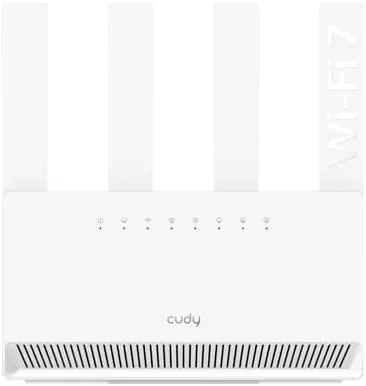
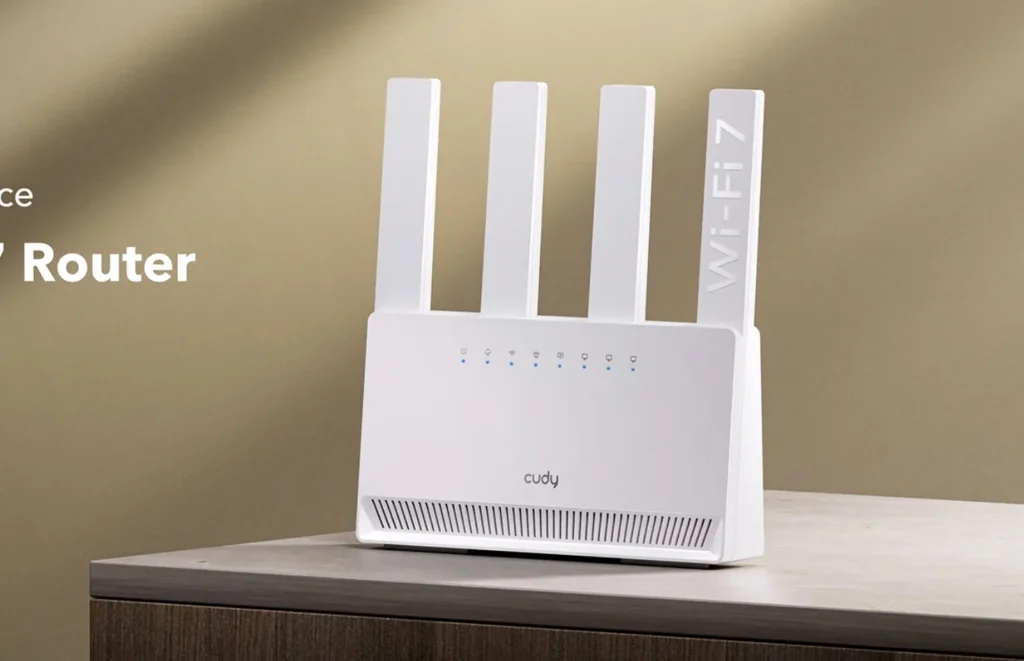
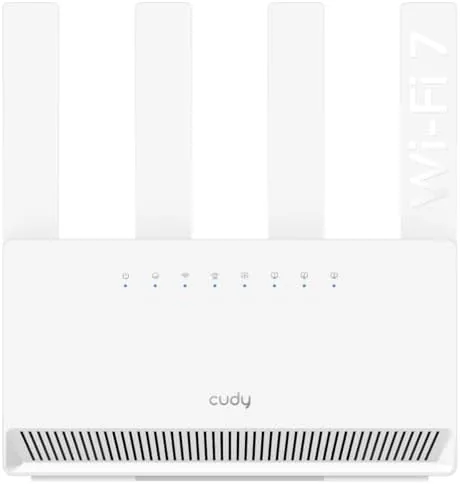
The Cudy WR3600E presents a surprisingly compact and lightweight vertical design, a departure from the bulkier Wi-Fi 7 behemoths. Its four fixed antennas, while offering beamforming, cannot be adjusted, which might limit fine-tuning for optimal signal. The front features minimal branding and a line of status LEDs for power, 2.4 GHz, 5 GHz, and network ports. However, a closer look at the rear reveals the most significant cost-saving measures, directly impacting the router’s utility for a high-performance gaming environment:
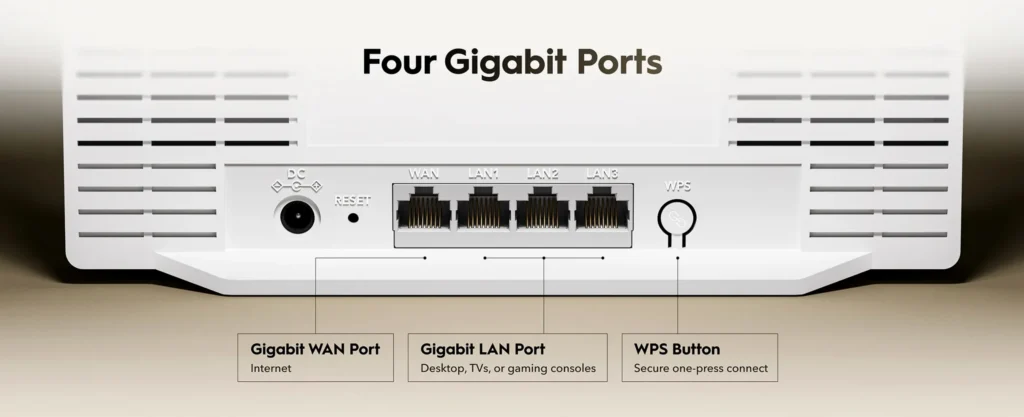
- Limited Ethernet Ports: The inclusion of only a single Gigabit WAN port and three Gigabit LAN ports is a critical bottleneck. Most modern Wi-Fi 7 routers, even other dual-band models, typically offer at least one 2.5 GbE WAN port and often more LAN ports, which are crucial for high-speed internet connections and direct wired gaming setups.
- No USB 3.0: The complete absence of a USB 3.0 port means users cannot connect external storage or other peripherals directly to the network. This eliminates convenient network-attached storage (NAS) functionality or media server capabilities, a feature commonly found in slightly more expensive routers.
- Dual-Band Focus: While branded Wi-Fi 7, the WR3600E operates exclusively on the 2.4 GHz and 5 GHz bands. It conspicuously lacks the 6 GHz band, which is a hallmark of premium Wi-Fi 7 experiences, offering significantly more bandwidth and reduced interference.
Cudy WR3600E Key Specifications
| Wi-Fi Standard | Wi-Fi 7 (802.11be) |
| Bands | Dual-Band (2.4 GHz, 5 GHz) |
| Max 2.4 GHz Speed | 688 Mbps |
| Max 5 GHz Speed | 2882 Mbps |
| CPU | Broadcom 2 GHz Quad-Core (ARM Cortex-A7) |
| RAM/Flash | 512 MB DDR3L / 128 MB NAND Flash |
| WAN Ports | 1 x Gigabit Ethernet |
| LAN Ports | 3 x Gigabit Ethernet |
| USB Ports | None |
| Antennas | 4 x Fixed High-gain (5 GHz: 6.8dBi, 2.4 GHz: 5.2dBi) |
| Coverage | Up to 1,400 sq ft (130 m²) |
| Special Features | MLO, OFDMA, Beamforming, VPN, QoS |
| MSRP | $79.99 (often street price under $70) |
Effortless Setup & Spartan Software: A User’s Perspective
Setting up the Cudy WR3600E proved to be straightforward, whether initiated through a web browser or the dedicated Cudy app. The process typically takes only a couple of minutes, guiding users through basic configurations such as WAN connection type, time zone selection, and setting custom SSIDs and passwords for both the 2.4 GHz and 5 GHz bands.
The router’s web-based Graphical User Interface (GUI) is functional but somewhat spartan, and occasionally overwhelming due to its non-standard layout of ‘Advanced Settings’ as numerous blue circles. However, it does offer a plethora of configuration options, including guest networks, Quality of Service (QoS), port forwarding, MAC filtering, and Wi-Fi scheduling. The Cudy app, by contrast, is far more intuitive with its tile-based homepage and proper menu system.
Performance Analysis: The Real-World Bottlenecks
Our testing of the Cudy WR3600E revealed a mixed bag of performance. While the router supports Wi-Fi 7’s Multi-Link Operation (MLO) for improved efficiency, its dual-band nature and lower transmission power inherently limit its capabilities compared to tri-band or higher-end dual-band Wi-Fi 7 units.
iPerf3 Throughput: Cudy WR3600E vs. Competitors (Conceptual Data)
Analysis aligning with findings showing the WR3600E underperforming its peers due to lower maximum throughput.
Across our 5 GHz iPerf3 throughput tests, the WR3600E consistently lagged behind its contemporaries at short range (6 feet), demonstrating its inherent throughput limitations. Interestingly, at longer ranges (25 feet), its performance was more competitive, sometimes even placing second, suggesting its signal strength holds up reasonably well over distance despite lower peak speeds.
Cudy WR3600E: The Ups and Downs
Pros
- Aggressive Pricing (< $70)
- Easy & Quick Setup
- Robust App Controls
- Compact & Lightweight
- MLO Support Included
Cons
- No 2.5 GbE Ports
- No USB Connectivity
- Lower Peak Throughput
- Small 1,400 sq ft Coverage
- Fixed, Non-Adjustable Antennas
The Competition: Better Value for a Few Dollars More?
The Cudy WR3600E’s primary challenge comes not from high-end Wi-Fi 7 routers, but from slightly more expensive budget-friendly alternatives that offer significantly more for a minimal price increase.
| Feature | Cudy WR3600E | TP-Link Archer BE3600 | GL.iNet Slate 7 |
|---|---|---|---|
| Street Price | <$70 | ~$81 | $169 |
| WAN Port | 1x 1GbE | 1x 2.5GbE | 1x 2.5GbE |
| LAN Ports | 3x 1GbE | 1x 2.5GbE, 3x 1GbE | 1x 2.5GbE |
| USB 3.0 | No | Yes | Yes |
| Coverage | 1,400 sq ft | 3,000 sq ft | Travel Focus |
LoadSyn’s Budget Wi-Fi 7 Pick:
For a modest increase of about $15-$30 over the Cudy WR3600E’s street price, the TP-Link Archer BE3600 stands out as a significantly better value. It offers 2.5 GbE ports and USB 3.0, providing a much more future-proof foundation for gaming.
The Fandom Pulse: Addressing Gamer Concerns
- Lack of 6GHz band: Users are missing out on Wi-Fi 7’s full potential for reduced congestion and higher speeds typically tied to the 6 GHz spectrum.
- Regional Availability: Frustrations exist regarding the inability to purchase specific regional versions (e.g., EU version in North America).
- Price Sensitivity: While the Cudy is cheap, gamers are willing to pay slightly more if the value proposition (like 2.5GbE) is significantly better.
The Cudy WR3600E: A Stepping Stone, Not a Cornerstone
The Cudy WR3600E stands as a testament to the rapid commoditization of Wi-Fi 7 technology. However, its significant compromises in fundamental areas like port configuration, limited coverage, and often subpar performance make it a difficult recommendation for competitive gamers seeking a truly robust upgrade. It functions, but ultimately feels like a stepping stone rather than a definitive solution.
Your Wi-Fi 7 Budget Router Questions, Answered
Is the Cudy WR3600E a true Wi-Fi 7 router?
Yes, it technically supports the 802.11be standard including MLO, but it lacks the 6 GHz band and 320 MHz channel width found in higher-end models.
Is the Cudy WR3600E good for gaming?
Its limited Gigabit ports and lower peak wireless performance might not be ideal for serious competitive gaming where low latency and high stability are paramount.